Changelog
We ship product updates weekly. Follow us on 𝕏 for the latest.
Automatic data export for custom analysis
We recently introduced manual data export, which enables you to download the complete feature usage of every company for every feature you’re tracking into a CSV file. This new improvement to the data export automates this process by continuously bringing Bucket data into your data warehouse – from Snowflake to RedShift via an AWS S3 bucket.
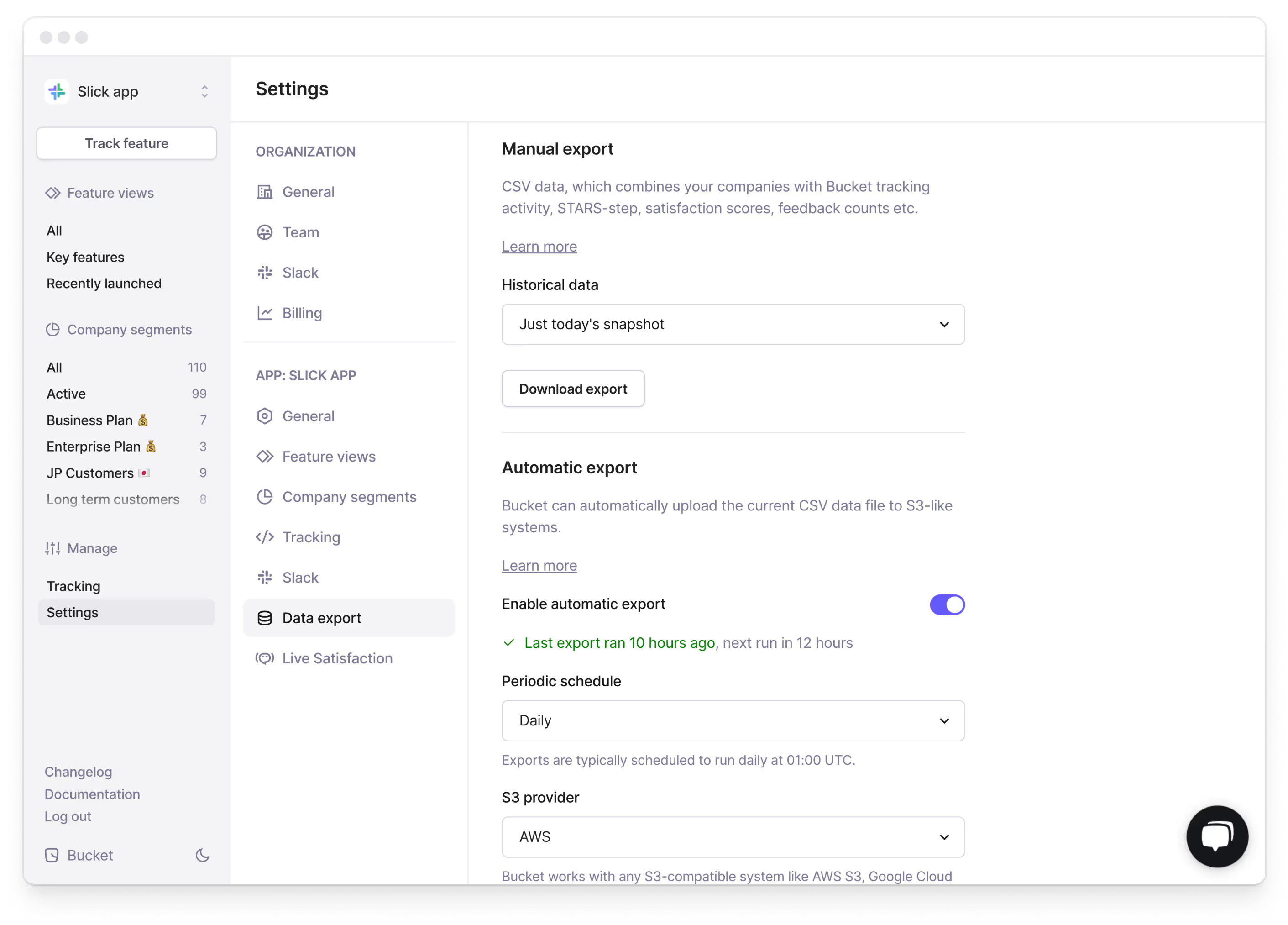
To get started, log into Bucket, go to App Settings and select the “Data Export” tab. You can now configure the scheduled data export into an Amazon S3 bucket – head over to our documentation here to learn more about the configuration and the options, like the daily and weekly cadence.
How can I use this in my organization?
Use the automated data export to empower other departments in your organization by blending Bucket data into their workstreams. A couple of examples:
Enhance CRM with Bucket data
By integrating key feature adoption metrics and satisfaction scores from our Live Satisfaction module into your CRM (say for example Salesforce or Hubspot), you can get a comprehensive overview of each customer, including their interactions with your product. On a daily basis, this can provide helpful context to your support team during customer calls, or it can be used to identify potential churner accounts based on their product usage.
Other customer facing teams can also benefit from the enhanced Bucket data, for example:
Sales – Customize sales pitches based on commonly used features or feature groups for specific target segments for greater relatability. Or identify upselling or cross-selling opportunities based on patterns in feature usage, for example by highlighting features that have high satisfaction or usage from similar customer segments on a higher pricing plan.
Marketing – Create truly product-data-driven marketing campaigns by identifying specific user segments based on their interactions with selected features and then measure the effectiveness of marketing campaigns by tracking changes in feature engagement over time.
Product Marketing – By mapping out feature interactions over time, Product Marketing teams can align their product launches with high-usage periods to maximize the visibility of new features. And after a launch, Product Marketing can share lists of high- or low-engagement customers with the support team to streamline activation campaigns.
Increase cross-functional collaboration
In a recent episode of Lenny’s podcast, Brian Chesky, the founder of Airbnb, makes the point that the health of an organization can be measured by how close the engineering and marketing department are. Our CEO, Rasmus, echoed this and shared his insights on Twitter and talks about how Bucket can help R&D teams work more closely with other departments, specifically with the marketing department:
Elevate data analysis with Bucket’s feature data
With this automation, you can now combine Bucket data with your relevant internal business metrics and level up your business intelligence analysis, build advanced visualizations and effectively tie business outcomes to product engagement data.
One of our customers uses the Bucket data to refine their companies churn model by adding product engagement attributes about feature retention to existing company attributes like company size, industry and more to build a more comprehensive model.
Get started with Bucket in minutes
Bucket connects to your product via Segment and through our API, so getting started is easy. Empower your product team and unlock feature value by combining product analytics and qualitative feedback – all in one place.
Click here to get started for free or click here to book an intro.
Easily track response rates for Live Satisfaction
Live Satisfaction enables you to automatically ask your users for feedback after they used a new feature. It’s easy to set up and an effective way to gather insightful user feedback for a specific feature.
With the new statistics module you can easily track the response rates and make sure that the automation you created is running smoothly.
For every feature that has Live Satisfaction enabled, you get a quick visual overview of how many users were asked, how many responded and how many dismissed the feedback widget in the past 7 days. It looks like this:

You can find the new statistics in the feedback tab for every feature that has Live Satisfaction enabled. If you have not enabled Live Satisfaction for that specific feature, you'll see instructions on how you can enable it.
Use Cases
In addition to checking the general health and response rates for your Live Satisfaction automations, you can also use the response rates to identify and quickly react to different scenarios. For example:
Use the subsegmentation feature to check response rates for different segments of your users, highlighting not only how different customers respond to the feedback prompt, but also how likely they are to provide feedback overall.
You can then dive deeper into the actual provided feedback from different user segments (e.g. power users vs. new customers) to help you make informed decisions about future product iterations.
Iterate on when to ask for feedback
Another scenario: Let’s say you are asking your users for feedback after they tried your newly released feature for the first time, but most of the feedback prompts are getting dismissed – this might indicate that users haven’t formed an opinion yet or that you are asking at the wrong time.
You can quickly go into the settings of the feature and change when you want to ask users for feedback – for example by increasing the number of required interactions, users now have to try a feature for multiple times before getting asked for feedback.
Finetune timings
Alternatively, if the statistics show a high rate of ignored feedback requests for a particular feature, it could indicate that the timing of the feedback prompt is not ideal.
Since the feedback widget is fully customizable, you can not only adjust the required amount of interactions, but also the timings of the feedback widget.
More updates soon!
Configure and customize table columns
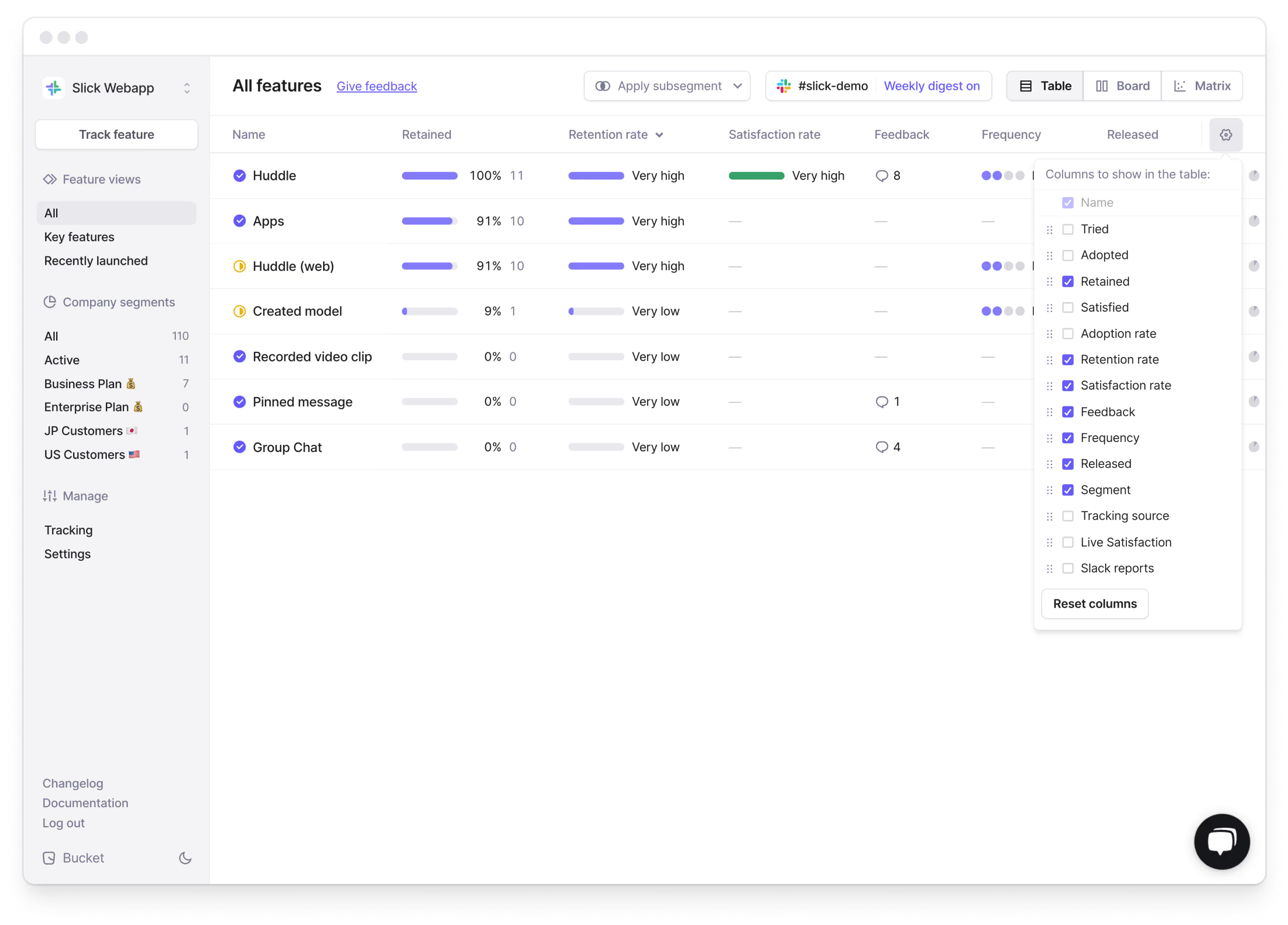
We’ve just shipped an improvement that allows you to add, remove and reorder table columns across the Bucket app. We have also added more metrics to the feature view table.
See it in action
To start customizing the table view, click on the ⚙️ icon on the right. You can now:
- Show or hide selected metrics simply by toggling the checkmark
- Re-order the table columns via drag-and-drop
- Use “Reset” to revert to the default table view
This improvement works across the whole Bucket app – everywhere where data is presented in a table format. But it really shines in the feature view table:
How can I use this?
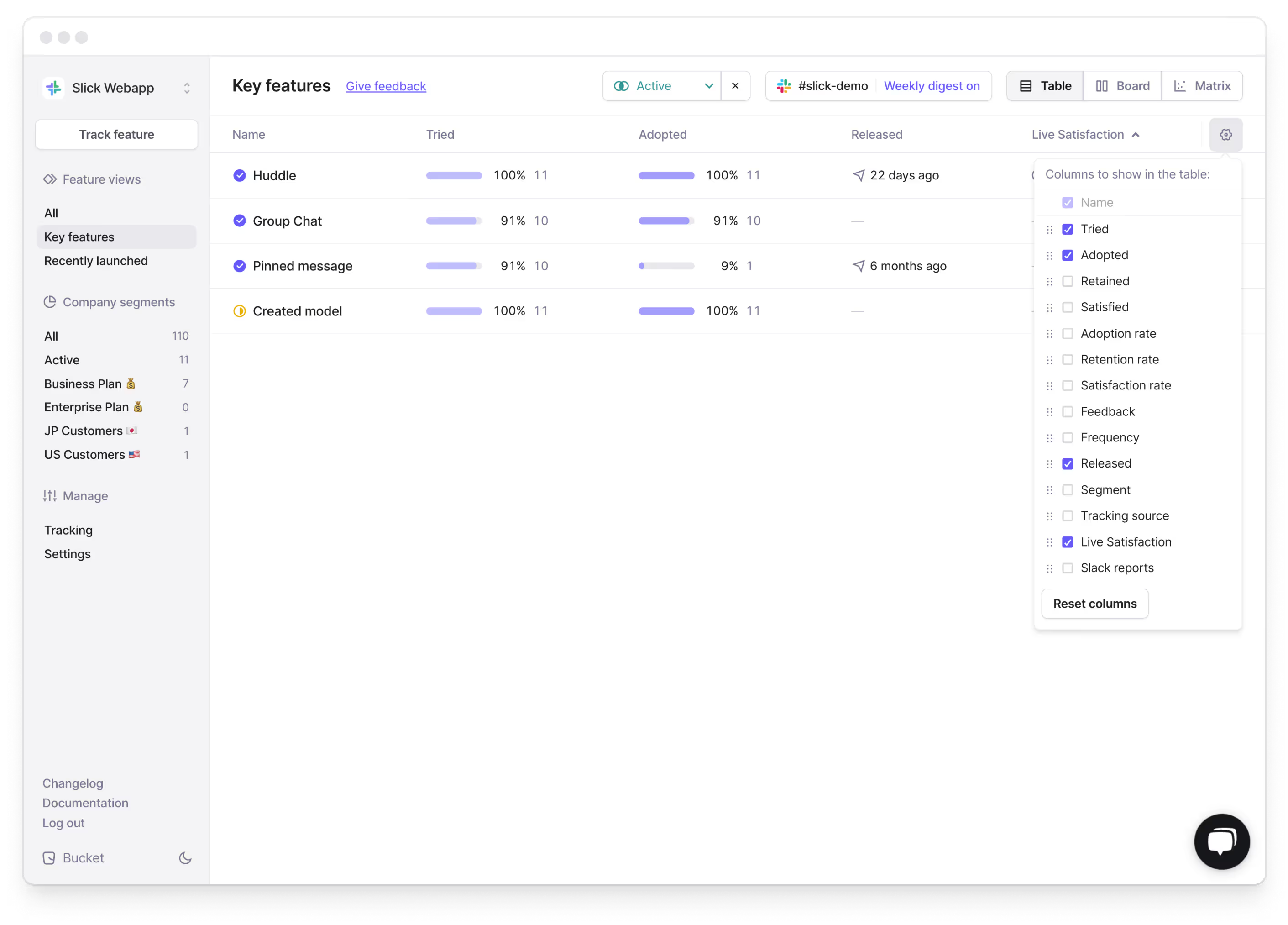
For example, you can now add the “Tried” and “Adopted” metric to the feature table view, then sort the table by release date and get a quick overview of how your recently launched features are performing.
More Use Cases
- By selecting specific subsegments and adding the STARS metrics to the feature view table, you can visualize the STARS funnel for all your features for specific segments.
- Go into focus mode by only showing specific metrics in the feature table view, for example during different stages of a product release cycle.
- Show the feedback count and Satisfaction rate to quickly gauge what features are receiving feedback and how satisfied your users are with it.
- Add the “Live Satisfaction” and “Slack Reports” columns to see which features have them enabled.
- Save specific table layouts or make them accessible for other team members by sharing the custom URL with them.
Get started with Bucket in minutes
Bucket connects to your product via Segment and through our API, so getting started is easy. Empower your product team and unlock feature value by combining product analytics and qualitative feedback – all in one place.
Having everything we need to make product decisions in one tool is a big time-saver for us.
Robert H., Product Owner @ Billetto
Click here to get started for free or click here to book an intro.
Introducing Live Satisfaction
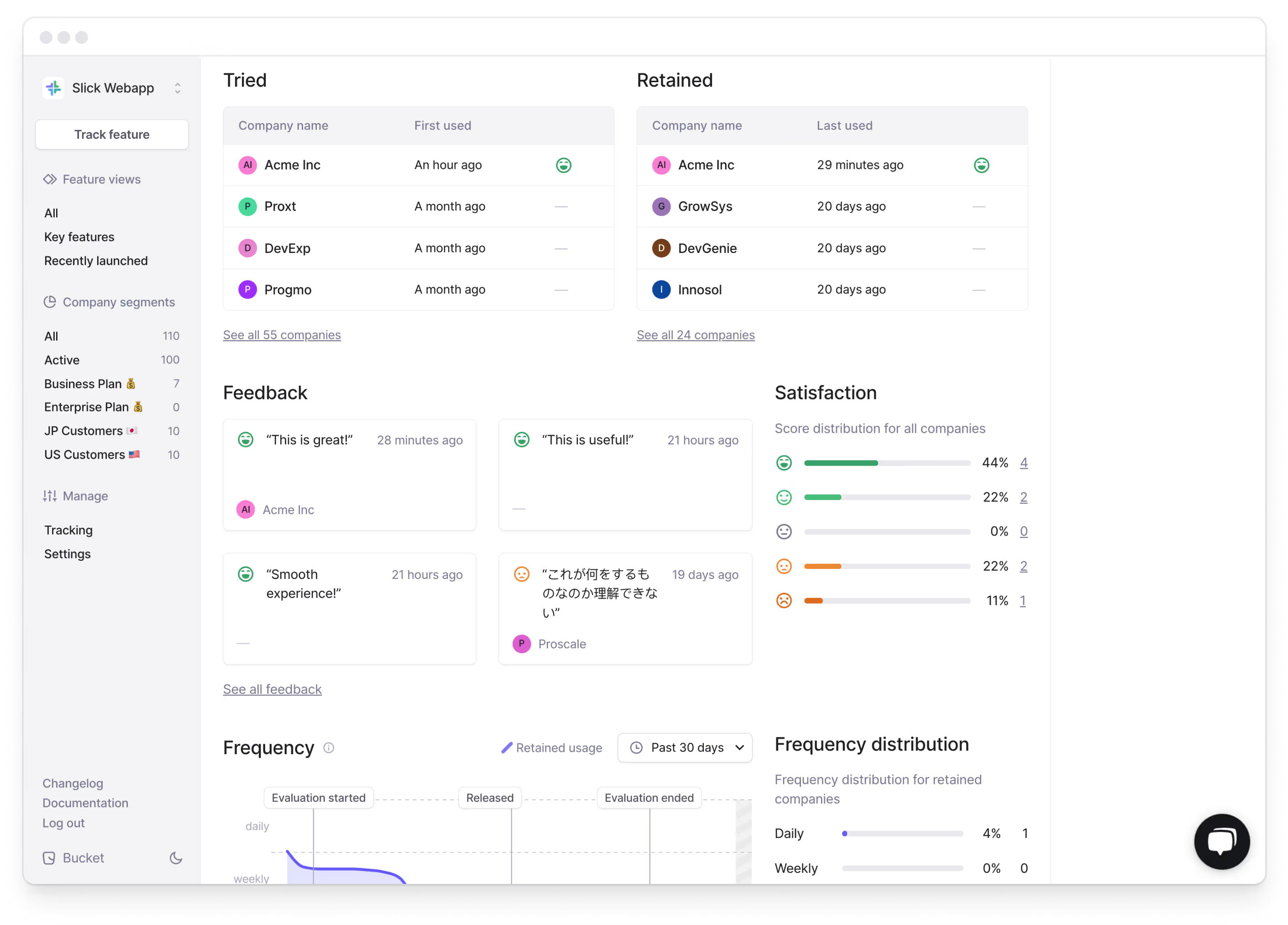
We are introducing Live Satisfaction – a no-code approach to collect qualitative user feedback for your features right from within Bucket. This makes Bucket your one stop shop for both quantitative product insights and qualitative user feedback on a feature level. Every feedback and satisfaction rating flows directly into the “Satisfied” metric in Bucket – which you can explore in the feature report. This will help you understand whether customers are satisfied with a feature in general.
How it works
Gathering insightful feedback is pivotal for steering your product in the right direction and to evaluate what your users think of a specific feature. And gathering the right feedback at the right time is just as important.
Watch the video below to see how you can easily start collecting feedback for your features from your users, right within Bucket:
The importance of qualitative user feedback
Feedback from your actual users is a rich source of insights that provides a deeper understanding of how your users think about your product.
While quantitative data is excellent for measuring metrics and identifying trends, qualitative data, for example the written feedback provided by your users, uncovers the “why” behind those numbers and helps to understand the motivations of your users, their frustrations, and overall sentiment – painting a complete picture of how your features are performing and perceived.
Bucket enabled us to start collecting qualitative user feedback, which plays a critical role in how we evaluate features.
Robert H., Product Owner @ Billetto
Today, most product teams either use different tools to gather qualitative user feedback, only collect company-wide NPS or don’t collect any user feedback on a feature level.
Getting started is easy
To get started, head over to the Bucket app, select the feature you would like to start collecting feedback on, go to Settings and click on “Enable Live Satisfaction”.
That’s it! You’re now collecting satisfaction - live!
In its default state, the feedback widget collects a simple customer satisfaction score and also gives the user the option to leave a comment. Please note that this widget will be hovering on the bottom right of your app.
You can now:
- Define the question you would like to ask your users.
- Define the minimum interactions before a user gets asked for feedback. This is useful if you want to collect feedback from users at different stages of the STARS funnel.
- Set the minimum and maximum time (in seconds) after an interaction for the feedback widget to be shown.
To learn more, head over to our documentation here.

Fully customizable

As product builders ourselves, we understand you want to have maximum control over the experience in your application. And to enable you to make collecting feedback in line with your design and user interaction guidelines, the behaviour, language, as well as the design of the feedback widget, are fully customizable via CSS.
To check out what and how to customize your feedback widget, go check out our documentation here or head over to GitHub for the full developer documentation.
Make feedback collection a part of your workflow with Bucket
Live Satisfaction is a major addition to Bucket's repeatable feature evaluation workflow:
Launching and evaluating features
Bucket is built upon the STARS framework, a funnel that, at its core, lets you understand the engagement and satisfaction of users for all your features. It measures feature satisfaction and enables you to evaluate feature performance consistently and for every feature you launch.
Compare and audit feature performance
All your features that are launched through Bucket are evaluated on a consistent framework, making it possible to analyse and compare feature performance. Use the Audit Matrix and Subsegmentation to compare feature adoption, retention, and satisfaction across different customer segments.

Measure customer satisfaction per feature
After you launch a feature or identify one that needs further investigation, it is easy to start collecting feature-specific user feedback with Live Satisfaction. All the collected feedback is seamlessly integrated into the Feature Report.
Integrate enriched Bucket data to make informed product decisions
Bucket is designed from the ground up to give Product teams fast & actionable insights. With our recently launched Data Export you can go one step further and easily integrate Bucket-enriched data into your own workflows, data warehouses or use it to strengthen cross-team collaboration by making it accessible to other teams, for example Customer Success.
Let’s recap
- You can now use Bucket to collect qualitative feedback from your users for specific features.
- To get started, head over to the settings for the feature you’d like to start collecting feedback for, enable Live Satisfaction and set a question.
- Both the design and behaviour of the feedback widget are fully customizable, making sure you are aligned with your design and UI Guidelines and allowing you to implement feedback collection seamlessly into your product.
To learn more about enabling, customizing and deploying your first feedback widget, head over to our documentation here or check out the full GitHub documentation here.
Get started with Bucket in minutes
Bucket connects to your product via Segment and through our API, so getting started is easy. Empower your product team and unlock feature value by combining product analytics and qualitative feedback – all in one place.
Having everything we need to make product decisions in one tool is a big time-saver for us.
Robert H., Product Owner @ Billetto
Click here to get started for free or click here to book an intro.
Introducing Subsegmentation
We've rolled out Subsegmentation to enable comparisons of feature adoption, retention, and satisfaction across different customer segments – allowing you to get a deeper understanding about what features specific customer cohorts use and how satisfied they are with them. Understanding which features matter to your customers in different segments is business critical – be it customers on different pricing plans or in different parts of the world.
Subsegmentation shines in the Audit Matrix
Subsegmentation works across the Bucket app, but is especially useful in the Audit Matrix. On the feature table and board view, you’ll find the new option to select and apply one of your company segments. In the Audit Matrix you can select multiple company segments which lets you easily compare how specific features perform with different company segments.
How do I use it?
Pick your features, as well as one or multiple segments you wish to compare. Your initial view will give you quick insights into how different customer segments have received your features.
This allows you to compare how a particular feature has been adopted in Japan versus in the US, or highlight feature satisfaction for customers on a Business pricing plan versus customers on the Enterprise pricing plan.
We’ve also added the ability to dig deeper into the data for a particular segment by clicking the dot on the matrix. This takes you to the feature report filtered for that particular segment:
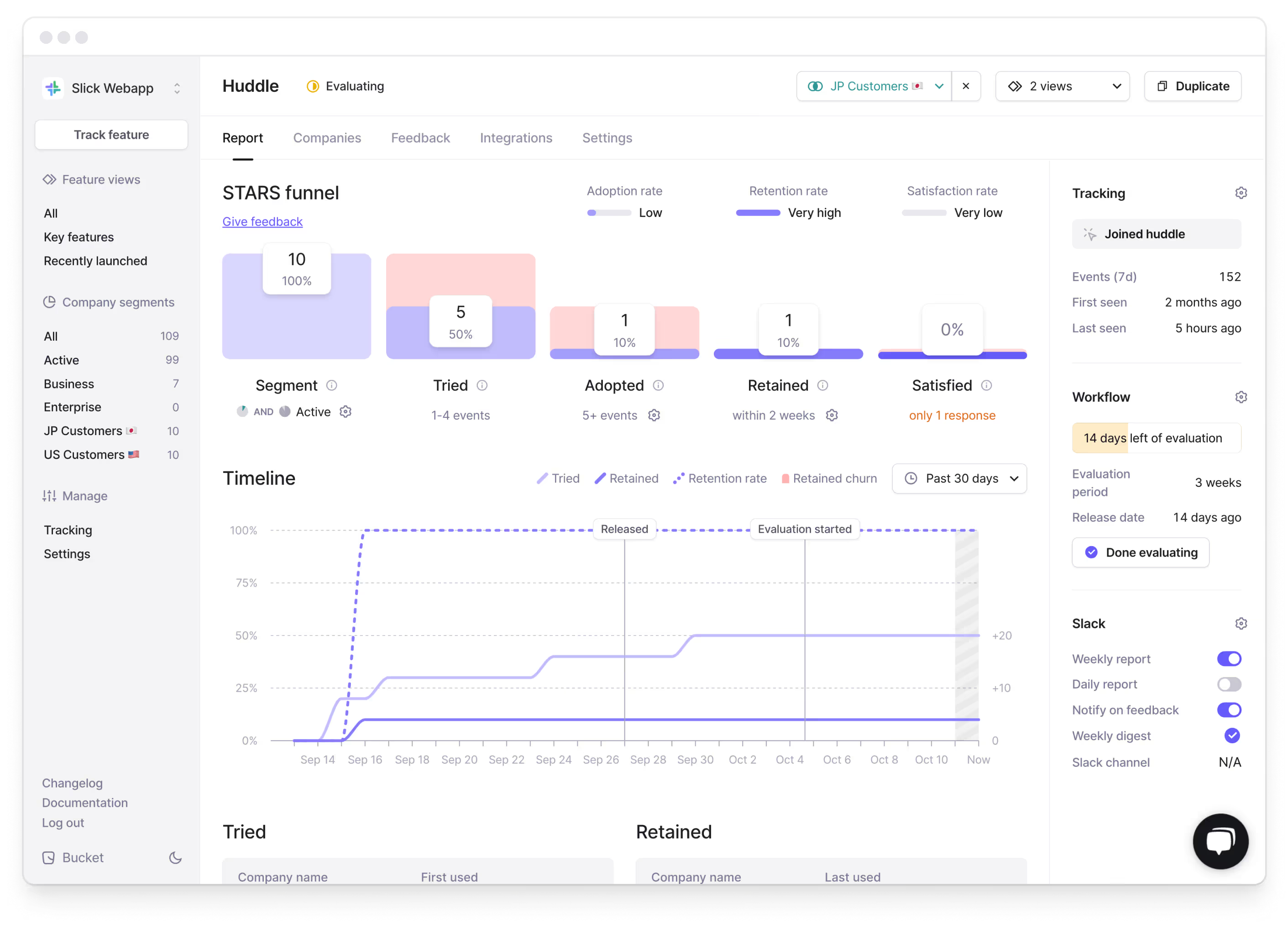
The data in the segmented feature report is calculated in the same way as the regular feature report, but it only includes the companies in the segment you have selected.
These additions together let you compare and contrast feature success across different customer segments as well as dig deep into the data for a particular segment of your customers on a particular feature.
Let’s recap
- A feature’s target segment specifies which customers have access to your feature. The feature report uses this segment by default.
- Think of Subsegmentation as a “magnifying glass” that allows you to zoom in and understand feature engagement for specific company segments.
- By comparing multiple subsegments, you can spot trends in feature engagements, for example how adoption varies between customers on different pricing plans or in different regions.
Get started with Bucket in minutes
Bucket connects to your product via Segment or through our API, so getting started is easy. Empower your product team and unlock feature value with product analytics & qualitative feedback – all in one place.
Click here to get started for free or click here to book an intro.
Introducing Data Export
We’ve added the option to export your Bucket data as a CSV file – so you can work with your data in your own data warehouse, your CRM or good old-fashioned Excel.

The data export feature enables you to download the complete feature usage of every company for every feature you’re tracking. To get started, log into Bucket, go to App Settings and click on the "Data export" tab. Here's a snapshot of what you can expect from your data export:

How can I use this in my company?
Bucket is designed from the ground up to give you fast and actionable insights into your product. By downloading Bucket’s enriched feature data, you can manipulate it as needed, import it into other systems or create custom reports to answer questions the Bucket UI does not yet answer. For example:
Create 360-degree customer profiles
Integrate key feature adoption metrics into your CRM for a comprehensive view of each customer’s interaction with your product.
Engage specific segments
Find customers with high satisfaction but low feature usage frequency, and re-engage them with targeted messaging.
Discover your power users
Just like in the screenshot above, use the Bucket data to determine who your power users are by filtering for those who are ‘retained’ for any combination of key features.
Create custom visualizations
Use the available historical data aggregations to create custom visualizations. For example, you can map out adoption rates over time or create cohort-style visualizations for feature adoption.
Time your feature launches
Plan feature releases aligned with high-usage periods based on the available historical data aggregations of the Bucket data export.
To learn more about the technical details and content of the data export, check out the documentation here. We'd also love to hear how you're planning to use the enriched data; feel free to reach out to us.
That’s it for now—happy data crunching! 📊
Inspect event attributes and see related features
We’ve just made it easier to debug event data and to turn any event into a Bucket feature.

The Tracking view now shows event attribute values when inspecting an event. This enables you to ensure and/or debug that the correct attributes and attribute values are in fact attached to the respective event.
In the new Related features section, we’ll show any features that are associated with the respective event. If none are, you can click Track new feature to easily transform the raw event into a Bucket feature with a single click.
More updates soon!
Analyzing feature usage and satisfaction at the company-level
We’ve just shipped an update to the company view that enables you to view feature engagement and satisfaction through the lens of a single company account.

In the screenshot, we’re looking at the “Feature usage”-tab for the “Prodash” company.
For each tracked feature, we can see where the company is in the STARS funnel, if they’ve provided any qualitative feedback to the respective feature, when they used it last, and what their feature activity looks like over the past 30 days.
We’ve also added tabs to this view so that you can browse feature usage (screenshot), all feedback and satisfaction scores provided by the customer, users in the account, and all attributes for the company.
The view unlocks a bunch of possibilities, like ensuring that key accounts are aware of, and using, most key features, upsell opportunities and for checking in on new feature adoption and satisfaction by certain accounts.
More updates soon!
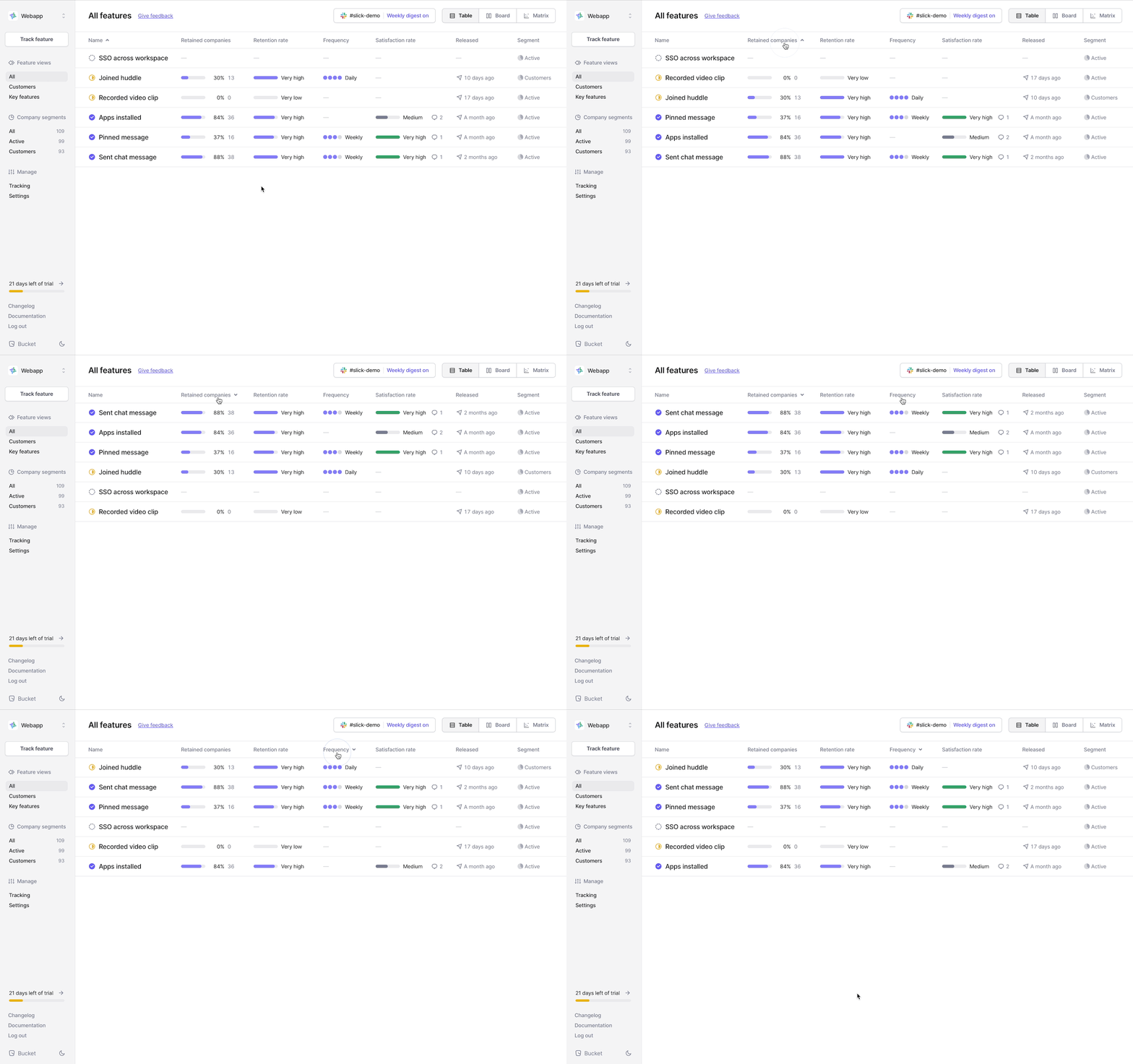
Sorting the features table
It’s now possible to sort the feature views by column. This enables you to quickly get a list of features with the highest retention, the lowest satisfaction, most frequency of use or latest release date.
This can help you detect key features with high retention but low satisfaction scores more easily. To understand why the satisfaction scores are low, and why the customers might be a churn risk, dive into the respective features and check the qualitative feedback from your customers.
Or, like shown below, this can help you surface opportunities. For example, features that are successful - with high frequency and/or satisfaction - but with low adoption or awareness.
More updates next week!
Introducing the Audit Matrix
Note: This post contains GIFs and therefore might take a few seconds to load.
Using the STARS framework on Bucket, you can quickly establish a consistent baseline for customer engagement and satisfaction of any feature.
But how does one feature compare to other key features in your product? And how do those comparisons change over time?
Answering those critical questions has just gotten a whole lot easier as we’re introducing the Bucket Audit Matrix!
The latest Bucket update introduces an essential feature for any product leader. An intuitive visual that charts all of your features side by side including changes over time with trendlines.
The Audit Matrix
The matrix is a wonderful visualization for comparing features side by side across two dimensions. The default typically shows adoption on the x-axis and frequency of use on the y-axis.
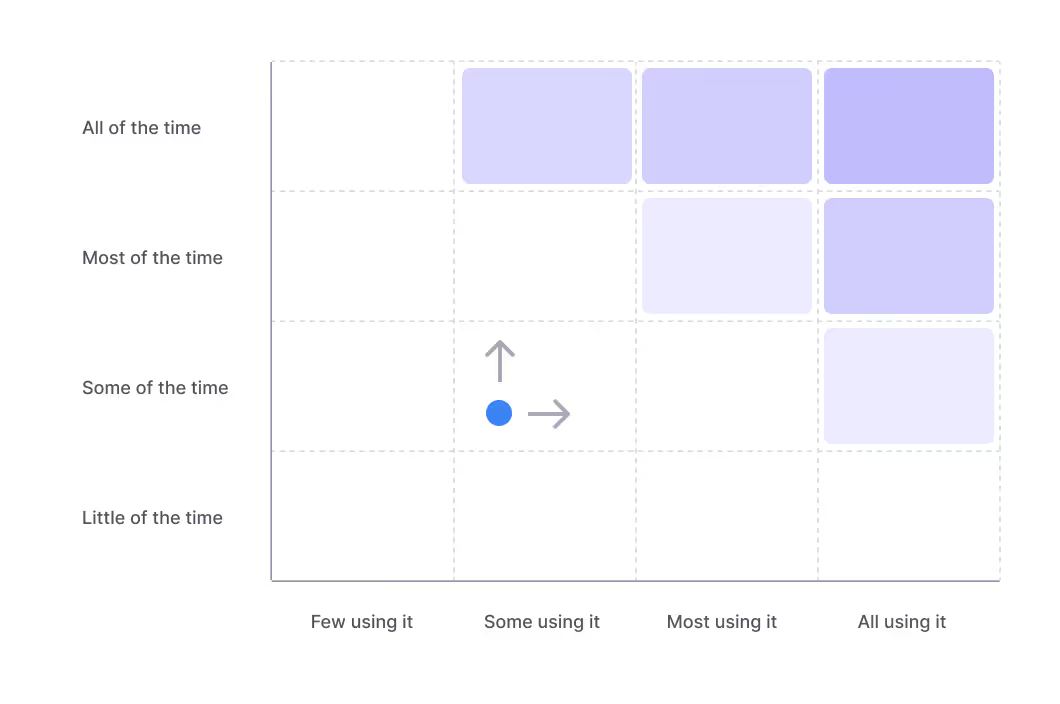
In B2B SaaS, most customers should be using key features at least once every subscription cycle. If customers don’t, they’re likely becoming a churn risk.
Therefore, if you have a monthly subscription cycle, you want to make sure that the key feature frequency is at least monthly, and ideally weekly or bi-weekly. If the feature isn’t used often and is a key feature for customers, you want to work on moving the feature upwards.
Then once the feature is sticky, you want to move it to the right and get more customers to use it.
Lastly, once the metrics look good, you want to increase customer satisfaction to make sure customers are happily retained.
Demo
Let’s see what the Bucket Audit Matrix looks like in action!
In this example, we’re looking at our fictional Slack competitor “Slick”. We’re tracking two recent feature releases - huddles and video recordings - and comparing them to one of our key features - sending chat messages.
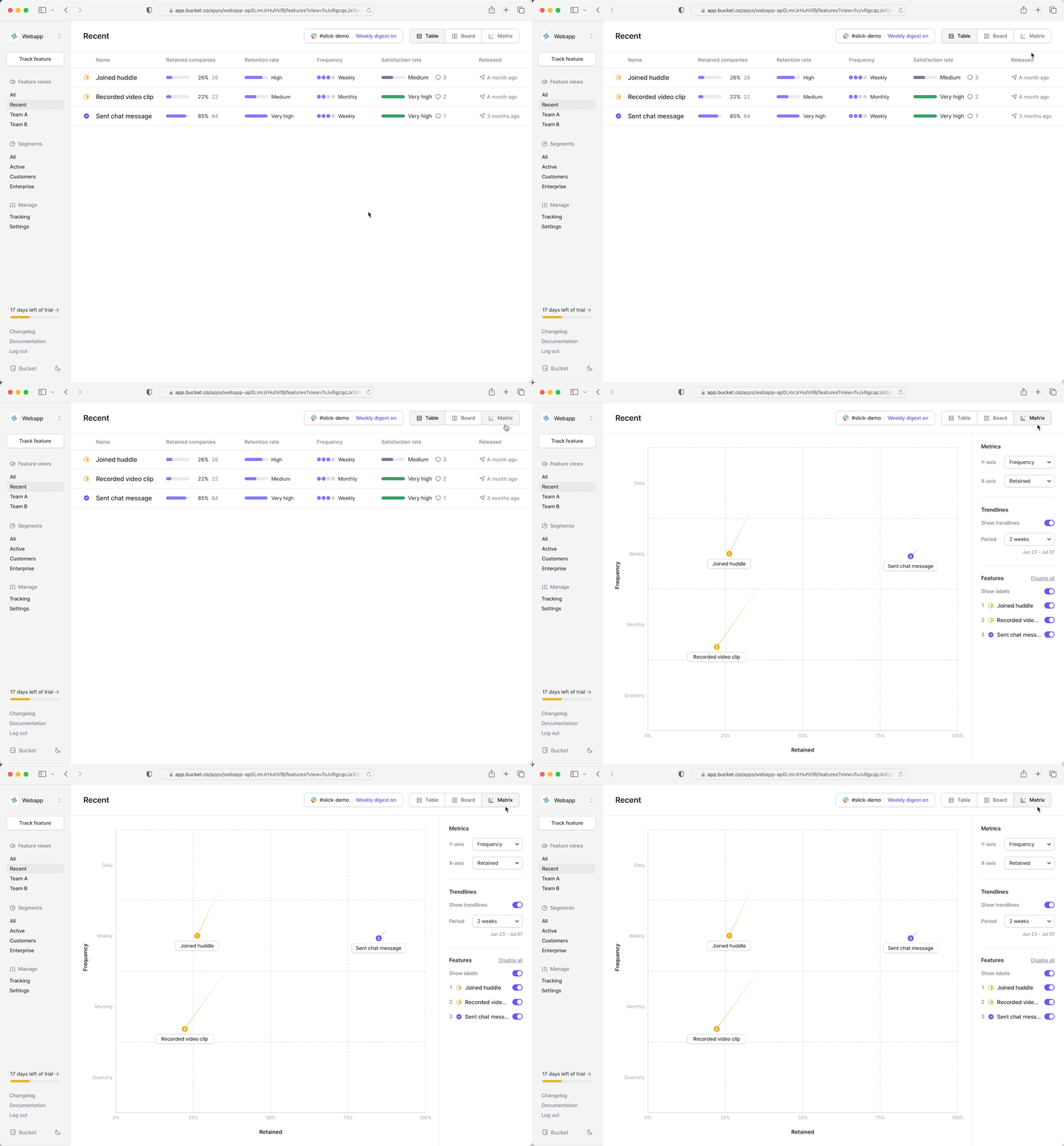
From the list view, we jump to the matrix comparison view. We can quickly tell that our new features (marked yellow as in evaluation period) aren’t seeing the same engagement as our key feature.
We can even see in the trendlines that the engagement has been decreasing drastically since the initial release. Users showed interest and tried the features but didn’t really find them valuable enough to keep using them.
That’s alarming! The huddles feature is intended to be a new key feature in our Slick product.

To investigate further, we swap the frequency axis with satisfaction - the qualitative layer on Bucket - to see how the features compare in this dimension. As feared, the satisfaction scores aren’t very high.

To learn why, we click the huddle feature to dive into the actual customer feedback. Here’s one piece of feedback:
"We'll stick with Zoom until we can use huddles for all-hands, too"
This indicates that the huddles feature is appealing but simply not feature-rich enough to be a viable alternative to something like Zoom.
So, we’ve validated the feature idea based on initial adoption (interest) and qualitative feedback, but we’ve also discovered that we need to invest in this feature to make it successful. If we do so, there’s a good chance we can move it up and to the right on the audit matrix, and grab a chunk of Zoom!
Get started today
The Audit Matrix is one of the most powerful visualization methods in a product leader’s toolbox and indispensable at any roadmap planning meeting. It works out of the box on Bucket as all features are tracked using the STARS framework and therefore comparable on the same axes.
To get started, simply start at Free trial and navigate to the Matrix view in the top right corner.
Happy roadmapping! 🏄