Changelog
We ship product updates weekly. Follow us on 𝕏 for the latest.
AI flag cleanup (Beta)
·
·

Tackling feature flag clean-up is an annoying part of using flags. Because it’s such a nuisance, cleanup frequently gets pushed aside. Then old feature flags linger, which clutter your codebase and make it more difficult to work with.
Most solutions to this just highlight flag references in your code. But that doesn't actually solve the problem, you still need to do the refactoring work.
At Reflag, we want you to spend your time building quality features, not cleaning up stale flags. So today we’ve released AI flag cleanup in beta for React.
AI flag cleanup works as a GitHub integration. By clicking a button in Reflag, we generate a pull request in your repository to remove no longer needed flag code for you.
Under the hood, the GitHub integration continuously checks the codebase against the feature keys in Reflag whenever a commit is pushed to the repository. When the AI clean-up bot operates, it searches for usage of the Reflag SDK in your codebase and identifies where specific feature keys are used. LLMs are employed to intelligently refactor the code to remove the flag and eliminate codepaths that become unreachable.
For React, this usually corresponds to the useFeature hook, like in this contrived example:
function StartHuddleButton() {
  const { isEnabled } = useFlag("huddle");
  if (!isEnabled) {
    return null;
  }
  return <button onClick={track}>Start huddle!</button>;
}
When the bot cleans up the file, it removes the hook and only retains the codepath remaining after assuming isEnabled=true:
function StartHuddleButton() {
  return <button onClick={track}>Start huddle!</button>;
}
If you're using ESLint and/or Prettier in GitHub Actions for code formatting, there's a GitHub Action workflow to use so that your setup is applied when generating PRs.
This is the first feature we’re announcing this week to bring you closer to zero maintenance feature flagging. Check out our launch week page for what’s new each day this week.
To get started using AI flag cleanup, connect the GitHub integration, or check out the docs for more details.
User permissions
·
·

We’ve added user permissions, so you can now invite, remove, and manage roles for your team members on our Pro and Enterprise plans.
From the Team Management page under Settings, invite new users with a link, or adjust the roles and actions each user can perform.
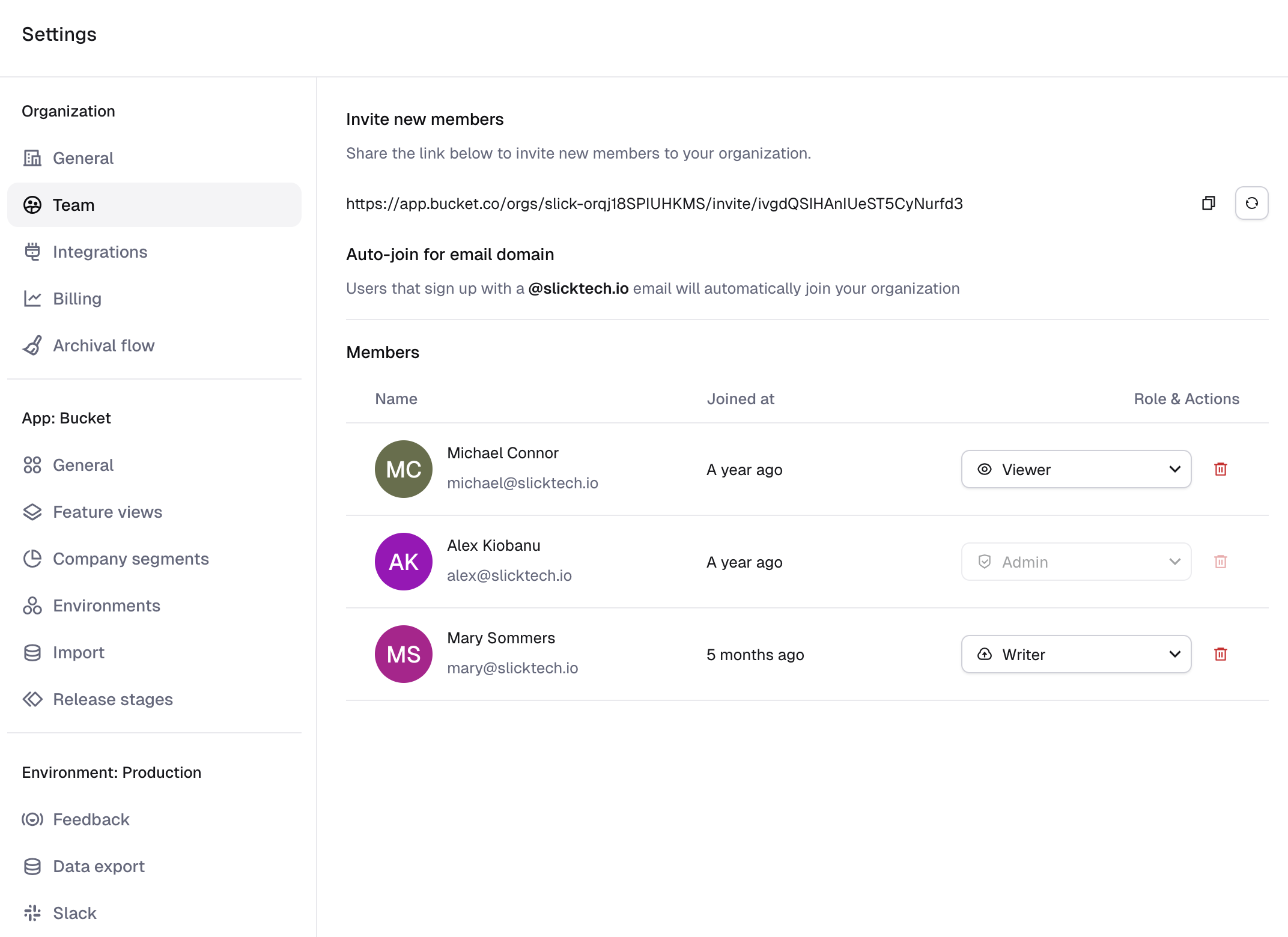
A member can have one of four roles, with differing permissions:
- Viewer: Can view content within your organization, but cannot make any changes (useful for non-technical staff to see who has access to features or check on the release status of a feature without interrupting developers).
- Writer (except production): Can create and update features, feature views, and manage feedback. Can modify non-production targeting for features and remote configs. Cannot alter organization-wide settings and most app settings.
- Writer: Can do everything that Writer (except production) can, plus production targeting updates and segment management.
- Admin: Full access to all features and settings, including managing other members' roles and removing users from the organization.
All new users invited to the organization are assigned the Viewer role by default. For more details, check out the Team Permissions page in our docs.
Cloudflare Workers support
·
·
We’ve added support for edge-runtimes like Cloudflare Workers to the Reflag NodeSDK.
To get started using Cloudflare Workers, set the node_compat flag in your wrangler file and use EdgeClient instead of ReflagClient.
To avoid any flag evaluation latency, Reflag maintains a cached set of feature definitions in the memory to decide which features to turn on for which users/companies.
The new EdgeClient uses a new strategy to keep these feature definitions fresh: The first request to a new worker instance fetches definitions from Reflag's servers, while subsequent requests use the cache. During an invocation when the cache has expired the request will be served using the stale cache while it’s being updated in the background, so response times are not affected.
This background work may increase wall-clock time for your worker, it will not measurably increase billable CPU time.
For more details, check out the docs that include a deployable example.
Vue SDK (Beta)
·
·
We've released a Vue.js SDK for Reflag, now in beta.
The Vue SDK supports feature toggling, tracking feature usage, requesting feedback on features, and remotely configuring features. It also comes with the same built-in toolbar as the browser SDK which appears on localhost by default.
To get started with it, install via npm:
npm i @reflag/vue-sdkFor more details, check out the docs.
Bulk management
·
·

We’ve rolled out a new bulk management experience to support targeting lists with thousands of individuals.
Reflag lets you easily target individual companies or users by searching for them by name or ID in the user interface. You can also target individuals by any kind of attribute attached to companies or users, and by using the “Any of” and “Not any of” operators you can manage a list of targets by attribute.
As an example, a big customer gives you a list of individual users which should gain access to a new feature you’re working on for them. The customer doesn’t know your internal IDs for those users, just their email addresses.
However, when you are targeting many individual companies or users these lists can be huge. To that end, we’ve improved the user experience when targeting many different individual companies or users:
We’ve also made performance improvements across SDKs and the UI to ensure that Reflag supports targeting lists with thousands of individuals.
Feature access diffs
·
·
We now produce a diff that summarizes changes to targeting rules. So when you’re about to change flag targeting for a feature in Reflag, you’ll see clearly how many users and companies have access currently, compared to how many will be targeted once you make the change.
We also show you if the stage has changed, too.
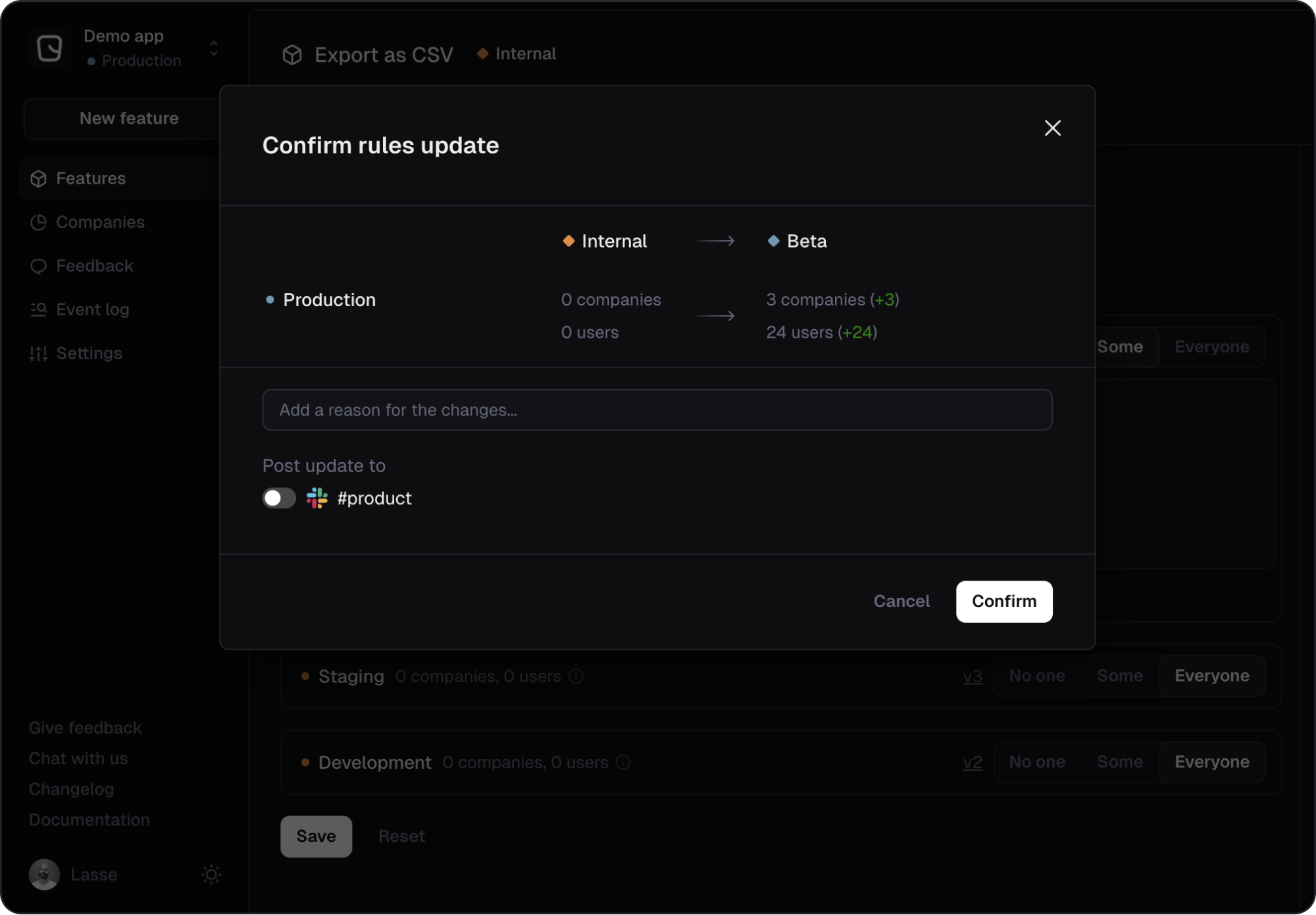
That should make rolling out features a little less scary.
Happy shipping!
Improved “access” column
·
·
We've just revamped the “Access in production” column in the feature list. It now more clearly shows you who has access to each feature at a glance.
The column has limited space, so it was an interesting challenge to show as clear a view as possible of the access rules in the space available. Targeting options on Reflag include segments (groups of companies), specific companies, specific users and custom rules that let you define advanced targeting.
The solution we came up with allows for up to three slots in the column and each slot can be used to either show an entity, like a segment or a user, or a summarized representation of a group of targets like “4 segments”, “29 users” and so on.
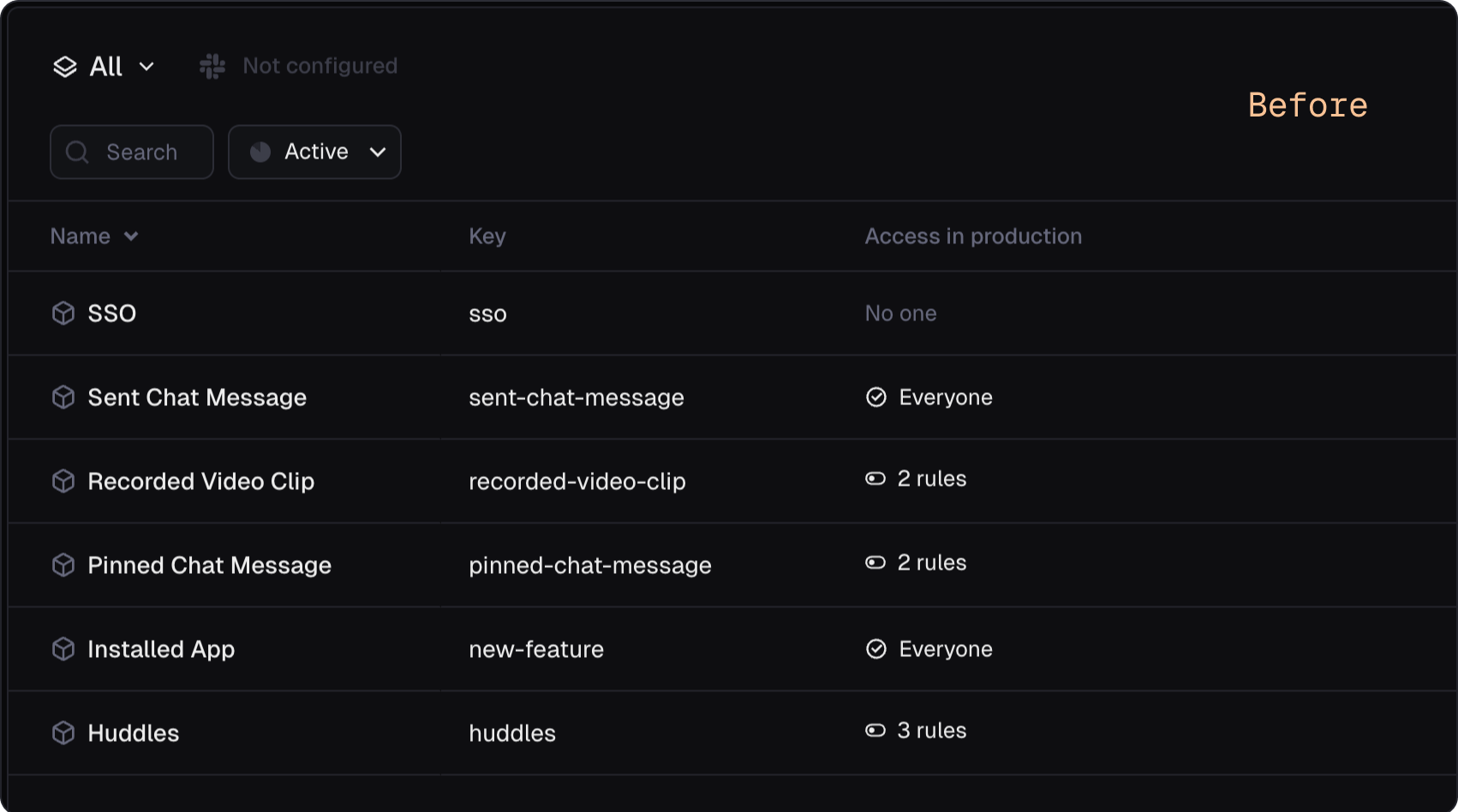
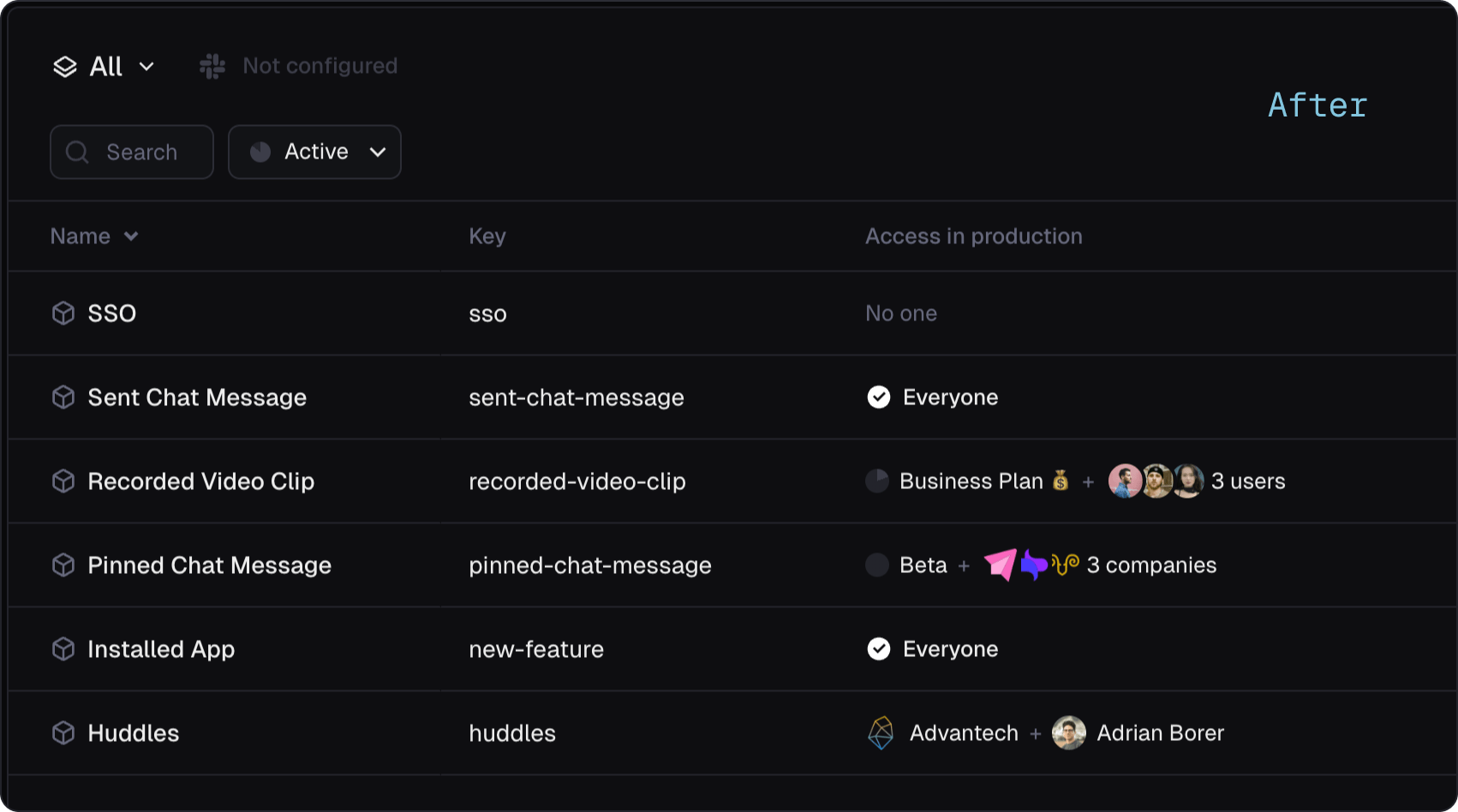
It prioritizes the groups of targets in the order listed above, showing entities over summaries. It falls back to summaries when the entities in a group cannot be fully shown in the slots available. If there are too many different types of targets to show them all in the column, it will use the third slot to show a “and more” indicator.
Linear integration
·
·
For flags to be frictionless they need to work well with the tools you already use. That’s why we’re building deep integration between Bucket and Linear, to connect flags with the tool you use to plan and build new features.
Bucket agent for Linear
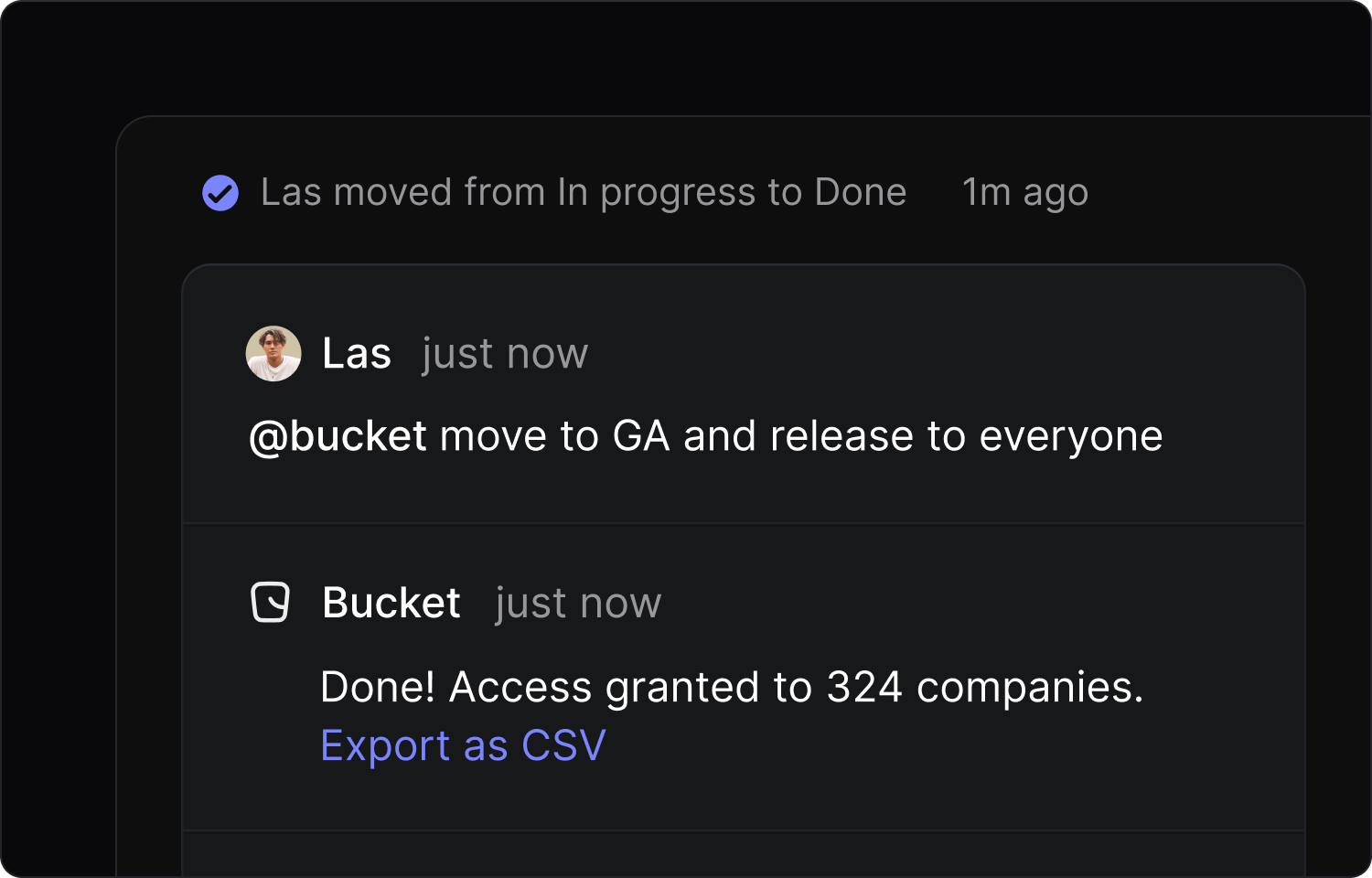
To start, we’ve partnered with Linear on the launch of Linear for Agents. With the Bucket agent, you can create and manage feature flags and update access rules directly from Linear.
For example, if you’ve built a “Download CSV” feature and want to create a flag for it, mention @bucket with "create flag" in a comment on Linear. The Bucket agent will then do it for you, creating a feature key on bucket.co with a relevant name.

Want to change who can access that feature? Drop @bucket a note, like 'release this feature' or 'give Acme access to this feature' from within a relevant issue.
Send access change notifications to Linear
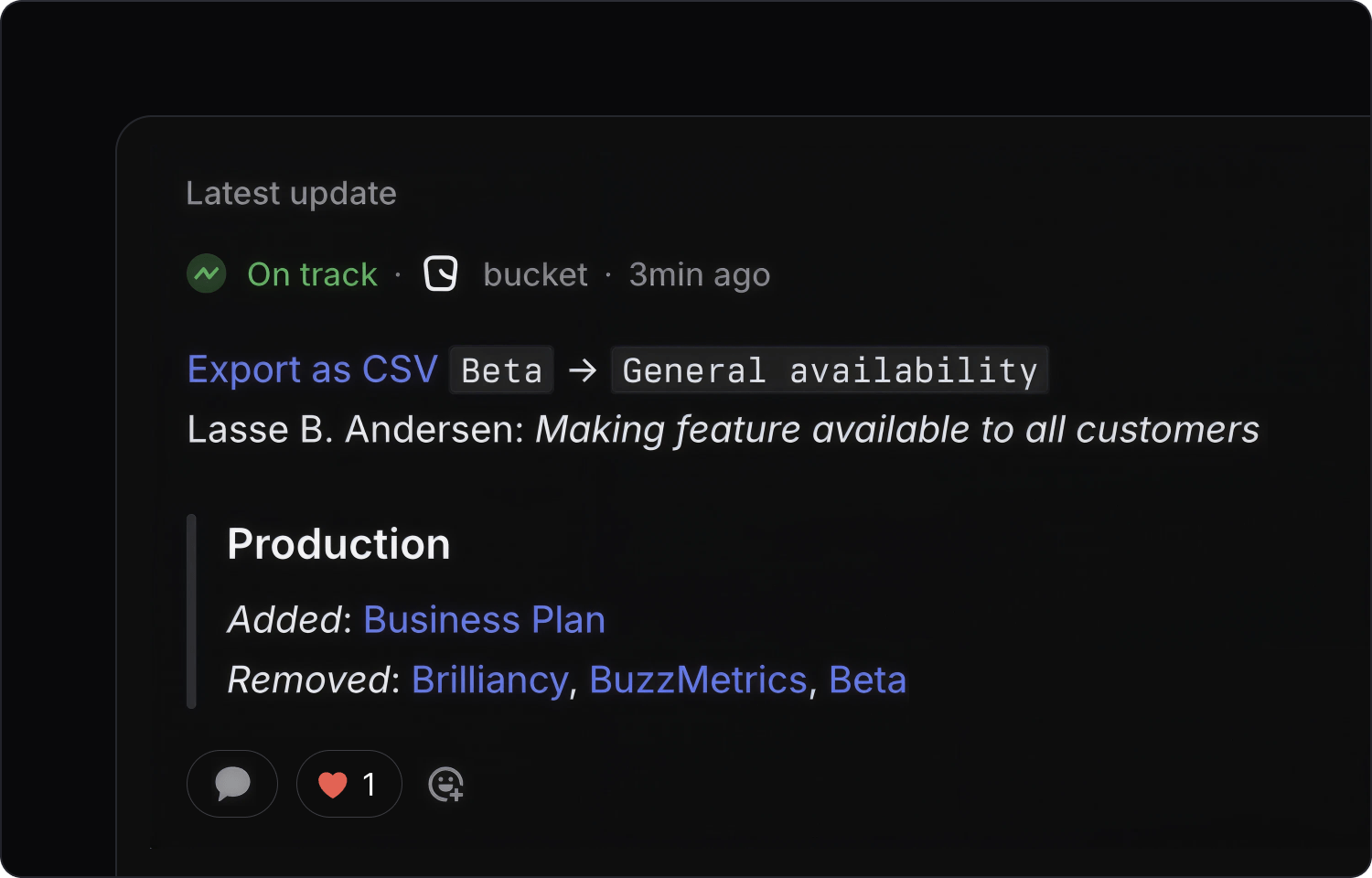
To keep your team up to date with which features are enabled, for who, and what stage a feature is in, you can automatically share access changes.
Whenever a feature targeting rule is updated, a new comment is added to the linked Linear issue or project showing what changed.
Get started
To connect Bucket with your Linear account, navigate to the Integrations section for your organization and use the "Connect to Linear" button to initiate the authorization process. For help configuring the integration, check out our docs.
Vercel Flags SDK provider for Reflag
·
·
In cooperation with Vercel we’ve launched a native Flags SDK adapter for Reflag.
The Flags SDK is an open-source library that gives developers tools to integrate feature flags in Next.js applications.
You can now use it with Reflag as the provider. The SDK sits between your application and Reflag, giving you a flexible way to control features at runtime without redeploying.
Reflag provides the evaluation logic for flags and the flags you define on Reflag show up in the Vercel toolbar. You can also see flag metadata like descriptions in the Flags Explorer.
We're excited to remove a little friction from using feature management with Next.js apps. Get started by adding the Reflag provider using the @flags-sdk/reflag module. Install it with:
npm install @flags-sdk/reflagCheck out the docs, or find out more about using Reflag with Next.js.
Happy flagging!
Remote MCP
·
·
Today, we're excited to announce a major upgrade to the Bucket MCP: a fully hosted remote service. So you no longer need to run a local MCP server through the CLI. The server config is now:
{
  "mcpServers": {
    "Bucket": {
      "command": "npx",
      "args": [
        "mcp-remote@latest",
        "https://app.bucket.co/api/mcp?appId=<YOUR APP ID>"
      ]
    }
  }
}
About Bucket MCP
Model Context Protocol (MCP) lets an LLM interact with external data, in this case the Bucket API. With Bucket MCP you can flag features directly from the chat window in your code editor.
To create a new flag, for example, ask the MCP to do it for you: “flag feature X with bucket.”
Bucket MCP will then create a feature key on bucket.co with a relevant name and give you IDE's LLM context to flag the feature in the codebase. You can edit feature access rules, too, with something like “give Acme access to feature X.”
What's New
With our latest update, the remote Bucket MCP brings several key improvements:
- Instant setup: No more local server setup required—just connect and start flagging.
- HTTP streaming: Enhanced real-time communication using the latest streaming tech.
- Secure OAuth: A simple and secure authentication flow.
- Auto updates: The MCP now gets automatic updates and improvements without local maintenance.
For existing CLI users: The mcp command has been repurposed to help you set up the remote connection. It now guides you through the configuration for your chosen editor, be it Cursor, Visual Studio Code, Claude Desktop, or Windsurf, rather than running a local server.
To get started with the remote Bucket MCP in your IDE, check out our updated instructions.
Happy prompting!