Changelog
We ship product updates weekly. Follow us on 𝕏 for the latest.
Improving the feature tabs
·
·

We’re always trying to make things simpler. As such, we’ve renamed the feature tabs and split them into tabs that each represent a clear use case. We’ve also improved the onboarding instructions per use case.
Clearer terminology
First, we’ve renamed the “Targeting” tab to “Access”, which is easier to understand.his tab is all about controlling feature access.
Secondly, we’ve split “Analyze” into “Adoption” and “Feedback” to provide both of those use cases with more real estate.
Here’s the new feature tabs – simple!
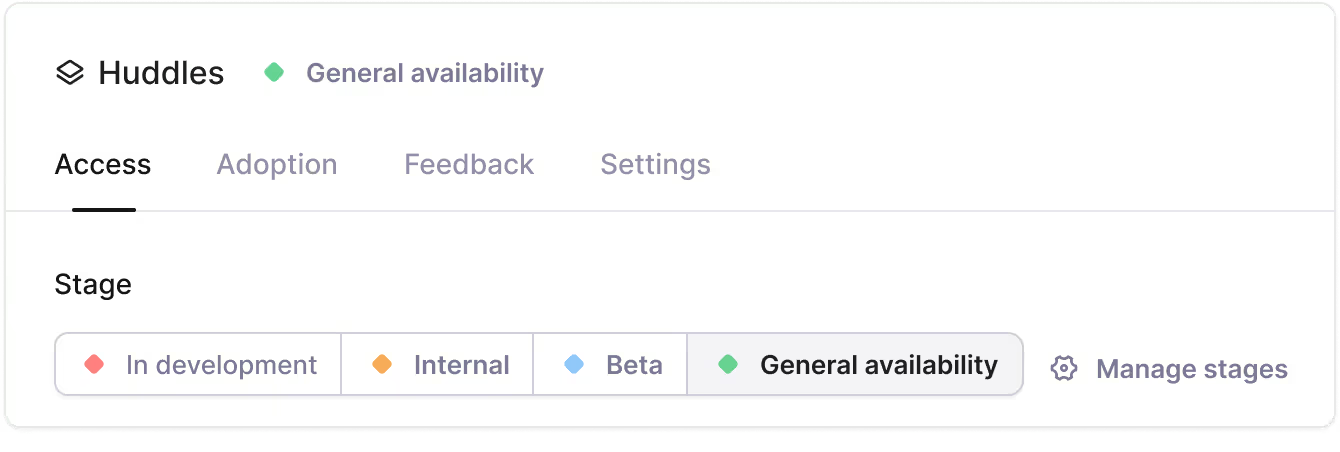
The new Feedback tab
The feedback tab includes a list of the latest feedback and a new satisfaction timeline that lets you easily track feature satisfaction trends over time.
The satisfaction timeline gives you a rolling average of satisfaction scores for a feature alongside qualitative feedback. It’s a simple way to visualize overall feature satisfaction, evaluate whether a feature needs an iteration, and then track an iteration’s impact on satisfaction.
You can select different evaluation periods and timing windows to track the impact of feature iterations on satisfaction.
Use case-specific code examples
We’ve also added specific instructions and code examples to each tab so they’re relevant to each stage of the release process.
When creating a feature, you're usually early in the development process and are only looking to implement a feature flag. That’s why the code example in the Access tab only contains the feature key.
When you’ve reached the beta or general availability rollout stage, you’ll likely add adoption tracking and feedback collection.
The code example in the Feedback tab looks like this:

Happy shipping!
Toggle feature access per company
·
·


You can now toggle features access directly on the company pages. This makes it even simpler to grant individual companies access to features in the Bucket UI.
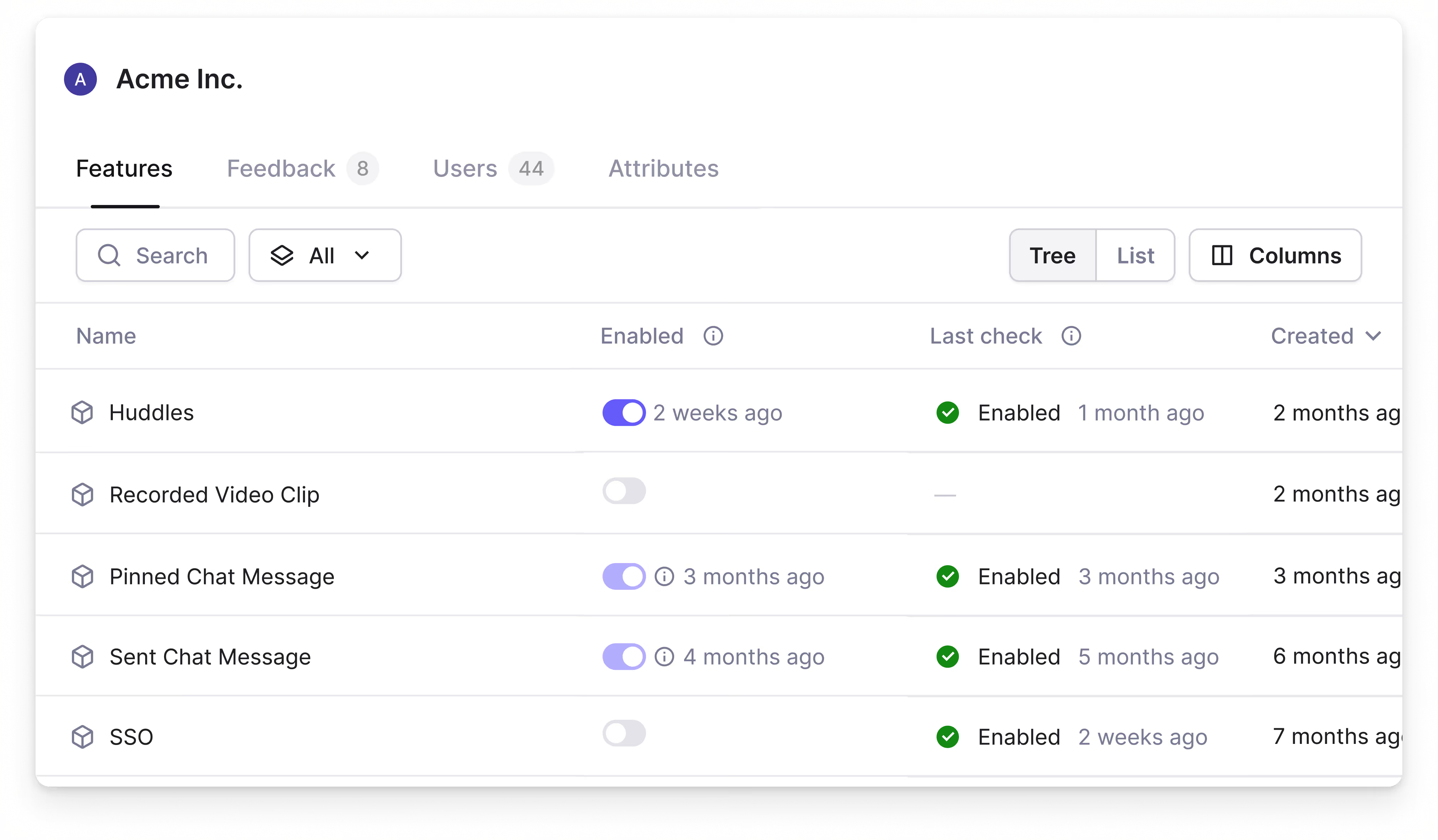
In B2B, customers get feature access based on the subscription plan. However, it’s not unusual for them to be given access to features outside of their set subscription.
You can now grant individual companies access to features by flipping a toggle on the company page.
Another practical use case for toggles is enrolling early adopters into the Beta stage of a new feature.
Feature toggles don’t alter your existing feature targeting rules. They simply add additional companies to the targeting rules, which is useful for granting ad-hoc access without changing the core targeting rules of a feature.

Note: You cannot use feature toggles to disable feature access granted by targeting rules.
Happy toggling!
Bucket SDKs now support the OpenFeature Tracking API
·
·

You can now use our adoption metrics and automated feedback surveys through OpenFeature.
OpenFeature is a small code layer that acts as an intermediary between your code and a feature flagging provider, letting you experiment with different providers with minimal changes to your codebase.
OpenFeature recently added the Tracking API, which allows developers to send tracking events to providers whenever a user does something noteworthy.
We’ve updated our OpenFeature Node.js SDK and OpenFeature Browser SDK to support this new API directly, making it easier to leverage our adoption metrics and feedback collection features if you use OpenFeature.
Happy shipping!
Adding deep links
We’ve added support for deep linking to the Bucket app.
Simply replace the environment name and ID in the URL with “/current/”.
For example, https://app.bucket.co/envs/current/features will direct you to the feature tab in Bucket.
This has also allowed us to directly link to the Bucket app in our documentation, making it easier to find the tabs or pages you need.
Happy shipping!
Polish season: Week #4
We’re into the 4th week of polishing our UI, SDKs, and backend as part of our commitment to making a world-class product.
We’re back after taking last week off to put together our roadmap for 2025 at our offsite in Berlin.
Here’s what we polished this week:
App improvements
- Let users create new features on Bucket by using flag.new
- Added a tooltip to the targeting UI to clarify the “Some” targeting rule conditions
- Put a “Give feedback” button on the app sidebar
- Added ID columns to the Users and Companies tables
- Polished the Slack alerts for access rules and release stage changes
SDKs
- Added
SDKVersionandServiceNameto feature flag events to make them simpler to debug - The React SDK and Browser SDKs now use new-style exports
- Improved the automated survey documentation to explain how to position the modal when using
requestFeedback
Bug fixes
- Improved the positioning of the automated survey popover widget so it always stays in the viewport
- Cleaned up legacy code and feature flags, which included making flag targeting validation stricter
- Fixed an occasional glitch where the “Hide feature sidebar” button didn’t appear in the Feature tab
Recap
With polish season coming to an end, this everything we've shipped over the past 4 weeks to make Bucket a robust, reliable, and intuitive product.
App improvements
- Overhauled the code instructions block. It’s simpler and actively listens for real-time checks or usage tracking
- Drastically improved internal data processing service start up times (reduced by 98.4%!) by initializing from stored aggregated values
- Included a feature view selector on the individual company screen under the Features tab
- New card design for the Analyze widgets.
- Simplified headers across the app.
- New card design for the Targeting environment rules.
- A rounded border-radius was added to buttons, inputs, and cards.
- Simplified the app and environment picker in the sidebar
- Polished the overall design of the feature sidebar
- Redesigned the main content area as a card
- Added a guide for feature entitlements
- Improved load times and stopped spinners from blocking the feature UI
- Updated the free trial indicator in the left sidebar for better clarity
- Added a new environment activity indicator to the feature sidebar
- Refactored some of the internal segment size estimation endpoints for increased simplicity
- Added a new profile menu to the bottom of the app sidebar
SDKs
React/Browser SDK
- Send feedback using the feature key instead of the feature ID.
- Added the requestFeedback function to allow users to implement the “Get feedback” button
Node.js SDK
- Now, it automatically sends
userandcompanydetails to Bucket when eitherbindClientorgetFeature(s)calls are made. This ensures that up-to-date information is pushed to Bucket so companies can be used immediately. Previously, you had to callupdateCompanyandupdateUsermanually. - Introduced the
enableTrackingoption to disable the sending oftrack,user,company, andflagevents. This is useful when you’re impersonating other users, for example. - Updated and expanded the SDK documentation
- Introduced offline mode to improve the behavior of the SDK in tests and on localhost
- Added options to set local feature overrides for localhost development
- Improved logging
- Made improvements to the installation and getting started process
- Introduced file and environment variable-based configuration
- Fixed a rate limiter issue where it would keep accumulating data
Bug fixes
- Streamlined the STARS funnel step icons.
- Filters no longer show errors when you open the popover.
- Updated autocomplete selectors so they all work the same
- Reduced loading flicker in autocomplete selectors when a user is typing
- Changed how rules were stored to stop some flag rules from being misrepresented as OR instead of AND.
- Fixed an ingest issue where remote contexts overrode the given context
- Solved an occasional bug where users were prompted to create a new organization after receiving an invite link
Happy shipping!
Simplifying the targeting UI
The targeting UI is one of the most important screens in feature management tools, our ambition is to make the world's best targeting UI for B2B SaaS.
In speaking to users, it became clear that almost all B2B targeting rules focus on either specific companies or a segment of companies. Bucket company-level aggregation and segments make this simple, so we doubled down on these common use cases.
We’ve simplified the targeting UI to make it more intuitive. We’ve added three presets:
- No one
- Some
- Everyone
These presets let you set targeting rules for features in the click of a button.
We’ve made defining the “Some” targeting rules simple while optimizing for the most common B2B use cases. You can add segments, individual companies, and individual users by simply clicking an “Add” button.

The whole team can be alerted to targeting rules updates through the Slack integration. A summary of all the targeting rule updates can be shared in the Slack channel of your choice.
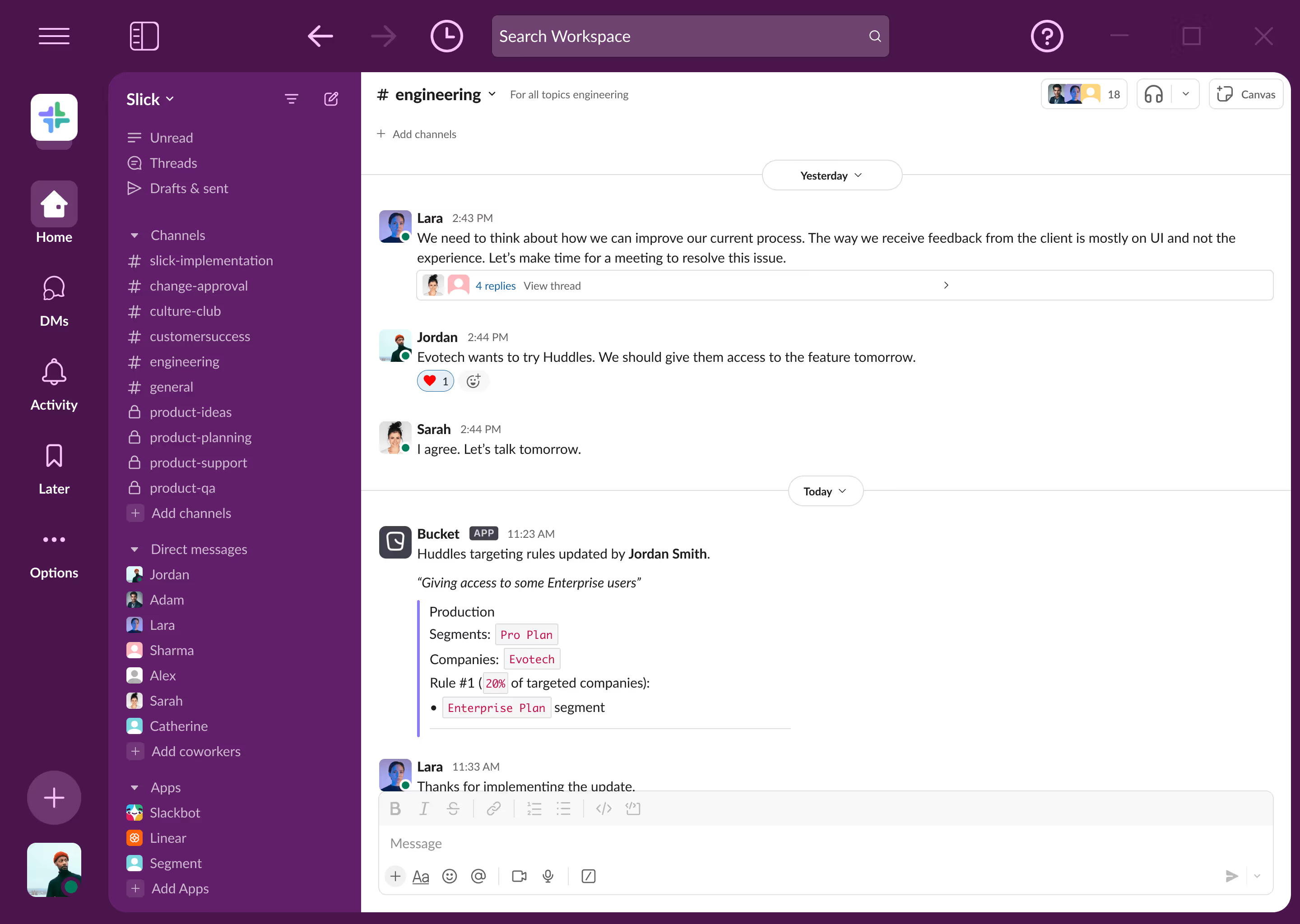
You can also still create advanced targeting rules when you need them with the "+ Add Rule" button.
Advanced rules let you specify rollout percentages and create targeting rules using company attributes, user attributes, feature targeting, or other contexts.
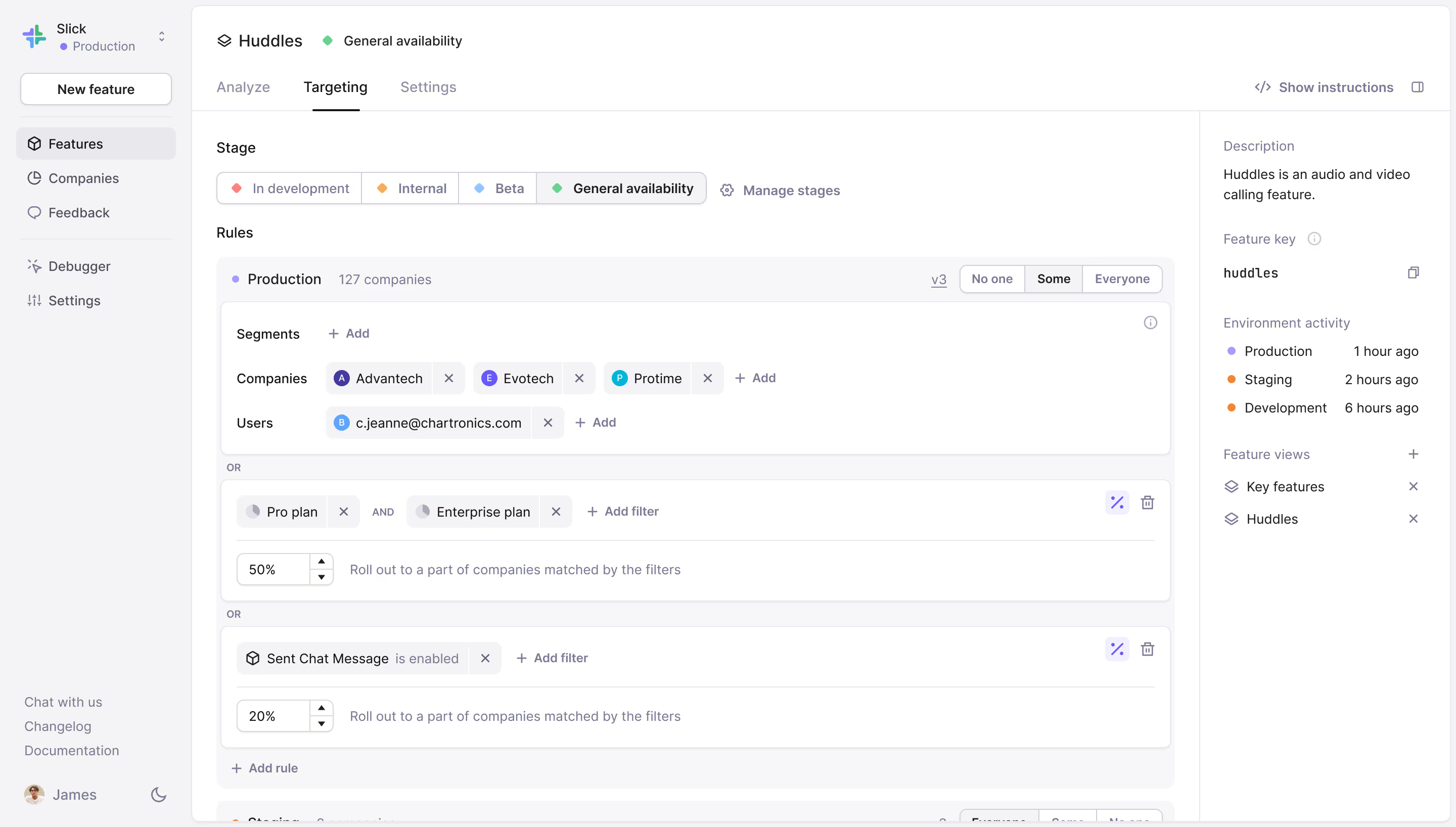
This is a great example of how Bucket’s focus on B2B lets us create a simpler product without sacrificing functionality.
Happy shipping!
Polish season: Week #3
It’s week 3 of polishing our UI, SDKs, and backend to keep Bucket as well-crafted as ever while continuing to ship new features and improvements.
Here’s what we polished this week:
App improvements
- Included a feature view selector on the individual company screen under the Features tab
- Added a new profile menu to the bottom of the app sidebar
- Improved load times and stopped spinners from blocking the feature UI
- Updated the free trial indicator in the left sidebar for better clarity
- Added a new environment activity indicator to the feature sidebar
- Refactored some of the internal segment size estimation endpoints for increased simplicity
SDKs
React SDK
- Added the requestFeedback function to allow users to implement the “Get feedback” button
Bug fixes
- Fixed an ingest issue where remote contexts overrode the given context
- Solved an occasional bug where users were prompted to create a new organization after receiving an invite link
Happy shipping!
Polish season: Week #2
We’re into week 2 of polishing our UI, SDKs, and backend to keep Bucket a high-quality product while shipping tons of improvements.
Here’s what we polished this week:
App improvements
- Drastically improved internal data processing service start up times (reduced by 98.4%!) by initializing from stored aggregated values
- Simplified the app and environment picker in the sidebar
- Polished the overall design of the feature sidebar
- Redesigned the main content area as a card
- Added a guide for feature entitlements
SDKs
Node SDK
- Updated and expanded the SDK documentation
- Introduced offline mode to improve the behavior of the SDK in tests and on localhost
- Added options to set local feature overrides for localhost development
- Improved logging
- Made improvements to the installation and getting started process
- Introduced file and environment variable-based configuration
- Fixed a rate limiter issue where it would keep accumulating data
Bug fixes
- Updated autocomplete selectors so they all work the same
- Reduced loading flicker in autocomplete selectors when a user is typing
- Changed how rules were stored to stop some flag rules from being misrepresented as OR instead of AND.
Happy shipping!
Signups automatically get a demo app
We’ve made it easier for new users to get a feel for Bucket by automatically creating a demo app full of realistic data when you sign up for the first time.
The “Slick” demo app is complete with features and demo data that lets you explore Bucket’s different features.
When you’re ready to integrate Bucket with your app, click “Switch to live app” in the sidebar to get started. The demo app will stick around until you delete it so you'll have a helpful reference when you start setting up your app.
Happy shipping!
Polish season: Week #1
Making a world-class product requires continuous care and attention to detail. We want Bucket to be a high-quality product that’s robust, reliable, and intuitive to use.
That’s why we’re spending the next five weeks polishing our UI, SDKs, and backend.
Here’s what we polished this week:
App improvements
- Overhauled the code instructions block. It’s simpler and actively listens for real-time checks or usage tracking.
- New card design for the Analyze widgets.
- New card design for the Targeting environment rules.
- Simplified headers across the app.
- A rounded border-radius was added to buttons, inputs, and cards.
SDKs
Node SDK
- Now, it automatically sends
userandcompanydetails to Bucket when eitherbindClientorgetFeature(s)calls are made. This ensures that up-to-date information is pushed to Bucket so companies can be used immediately. Previously, you had to callupdateCompanyandupdateUsermanually. - Introduced the
enableTrackingoption to disable the sending oftrack,user,company, andflagevents. This is useful when you’re impersonating other users, for example.
Browser/React SDK
- Send feedback using the feature key instead of the feature ID.
Bug fixes
- Streamlined the STARS funnel step icons.
- Filters no longer show errors when you open the popover.
Happy shipping!