Changelog
We ship product updates weekly. Follow us on 𝕏 for the latest.
Gradually release features with Stages
We’ve just added release stages to make it simpler to gradually release features. Release stages let you configure your commonly used targeting rules so you can easily apply them to features as you roll them out.
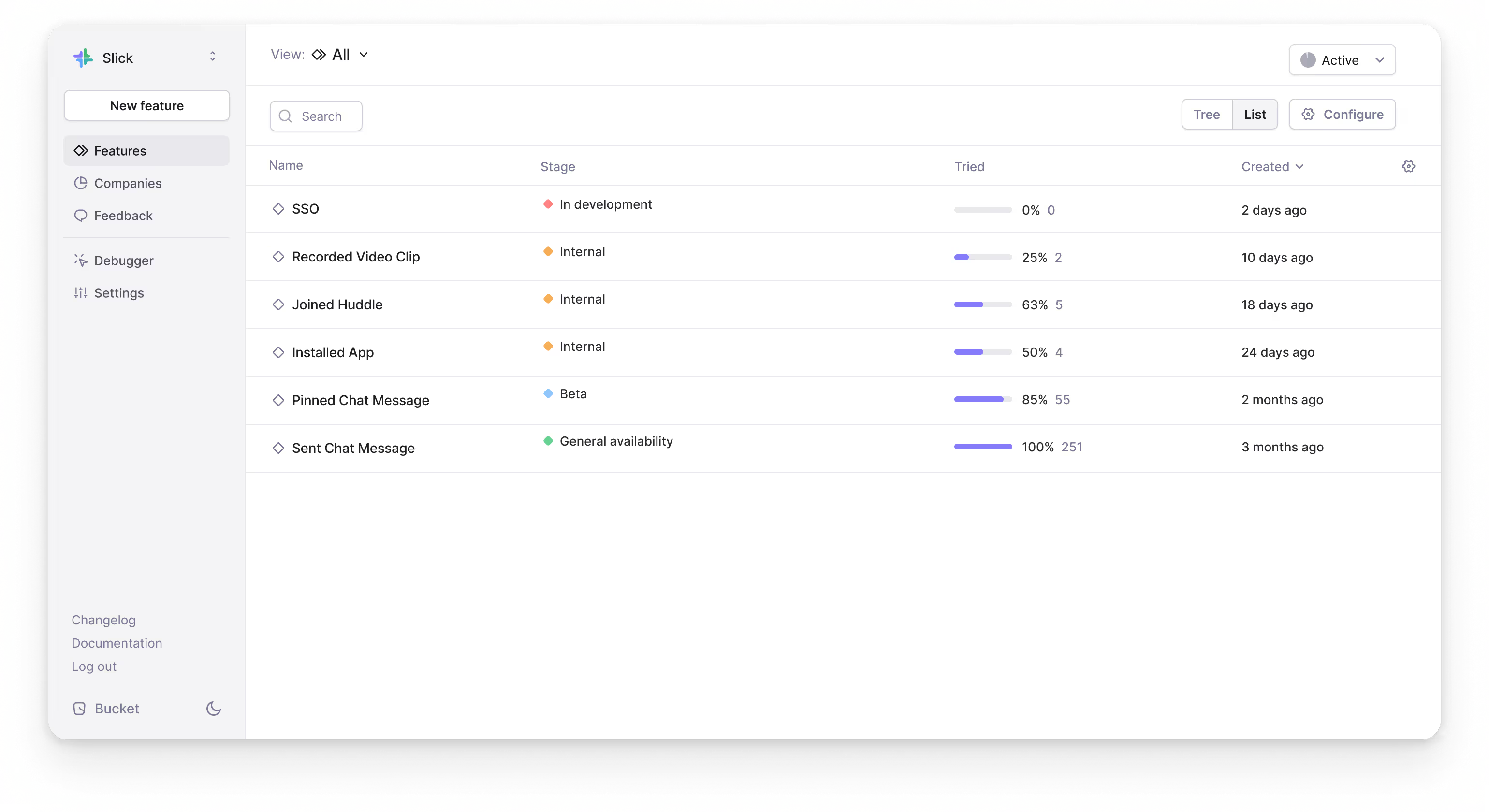
New apps come with 4 default release stages: In development, Internal, Beta, and General availability.
They support the common use case of taking a feature from development to internal testing to an optional beta testing phase then finally releasing to everyone.
Stages also make it easy for your team to see which rollout stage a feature has reached.

A stage consists of a name, color, set of targeting rules, and rollout percentage.
Targeting rules in Bucket let you target:
- A segment of companies
- Individual companies
- Individual users
- Custom contexts
You can edit or delete release stages under Settings.
To apply a stage to a feature, go to the Targeting tab and select a release stage. You have complete flexibility to add custom targeting rules for individual features.
Happy shipping!
Introducing remote attributes
We’ve rolled out remote attributes to make Bucket faster and easier to implement. Company and user attributes stored on our servers can now be used when evaluating feature flags.
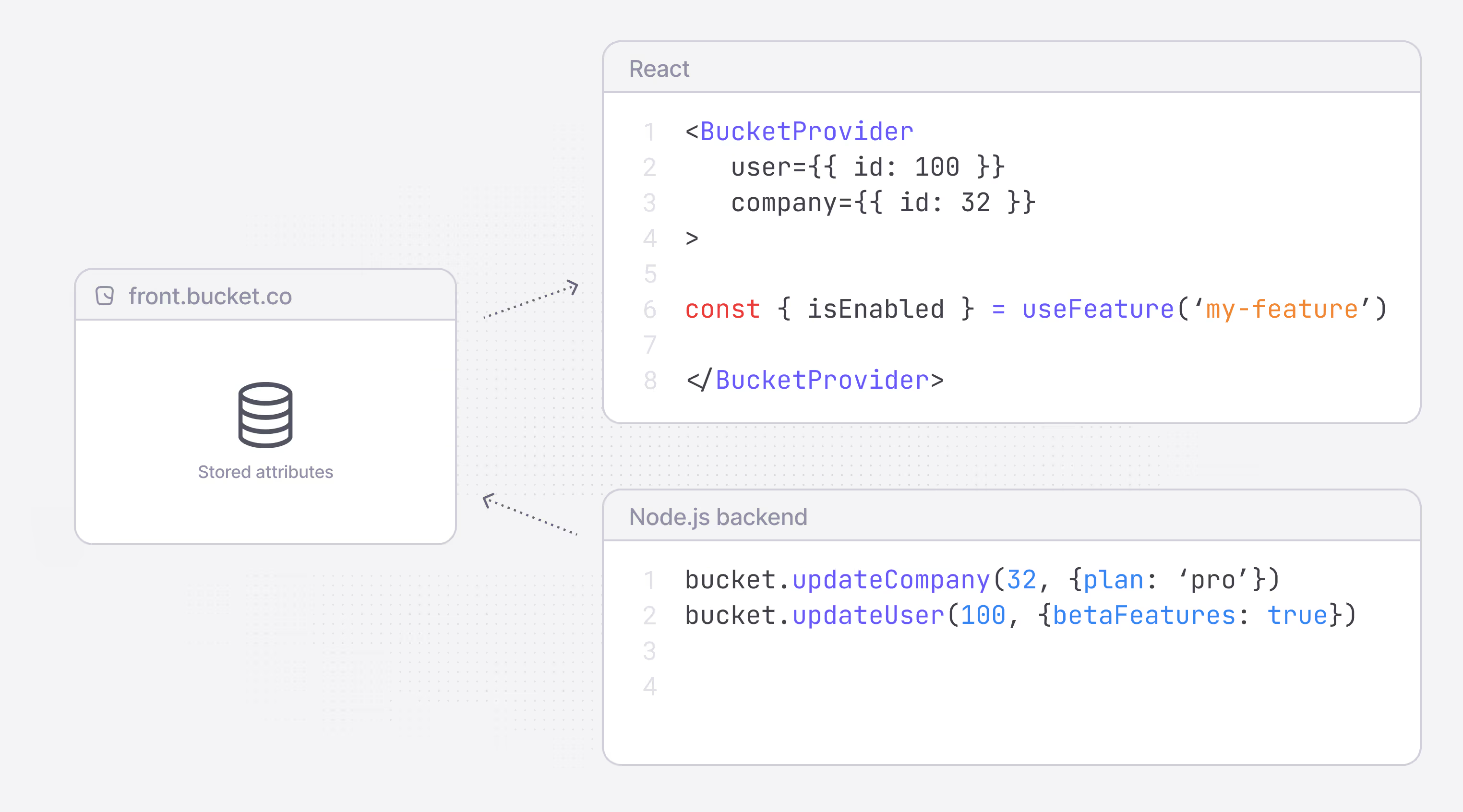
The introduction of remote attributes means that rather than having to fetch or compute all the required attributes each time a feature flag is evaluated, you only need to provide the Company ID and User ID when fetching features.
Attributes in Bucket are updated when they change, via the SDK, or periodically from your backend via the API.
Like so:
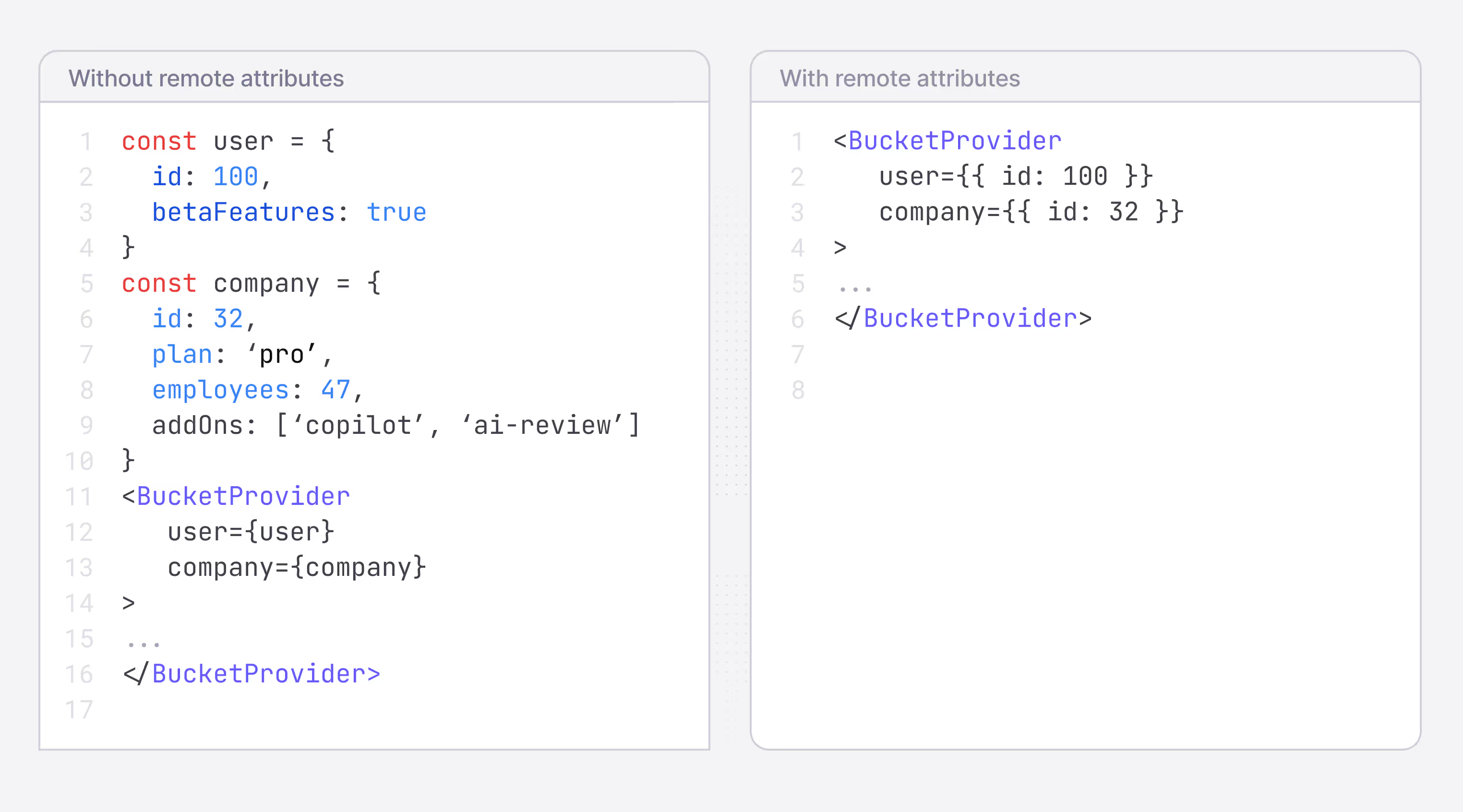
With remote attributes you can:
- Set the
company planattribute according to the customer subscription plan from your backend and then gate features access based on the plan from anywhere in your application. - Use an attribute called
betaUser: trueto gate who gets access to beta features. Then allow users to opt-in to beta features using a button in your application that simply sets the attribute in Bucket. - Integrate with your back office system to set a list of the add-ons that the customer has bought through an attribute in Bucket. For example:
addOns: [‘copilot-addon’, ‘ sso’]which you can then use in feature targeting.
Company and user attributes stored in Bucket are automatically used when evaluating feature flags in the case of our browser-based SDKs and can optionally be used in the server-based SDKs.
Setting remote attributes is a simple method call using our Node SDK. You can also set attributes through our Segment integration which allows you to continue using your existing setup.
By default, attributes are replicated to multiple locations across the globe in our global infrastructure to keep initial evaluation round-trip times low.
However, you have the option to keep your data exclusively within the EU if you need to adhere to certain data protection regulations.
Happy shipping!
Making it easy to detect stale flags
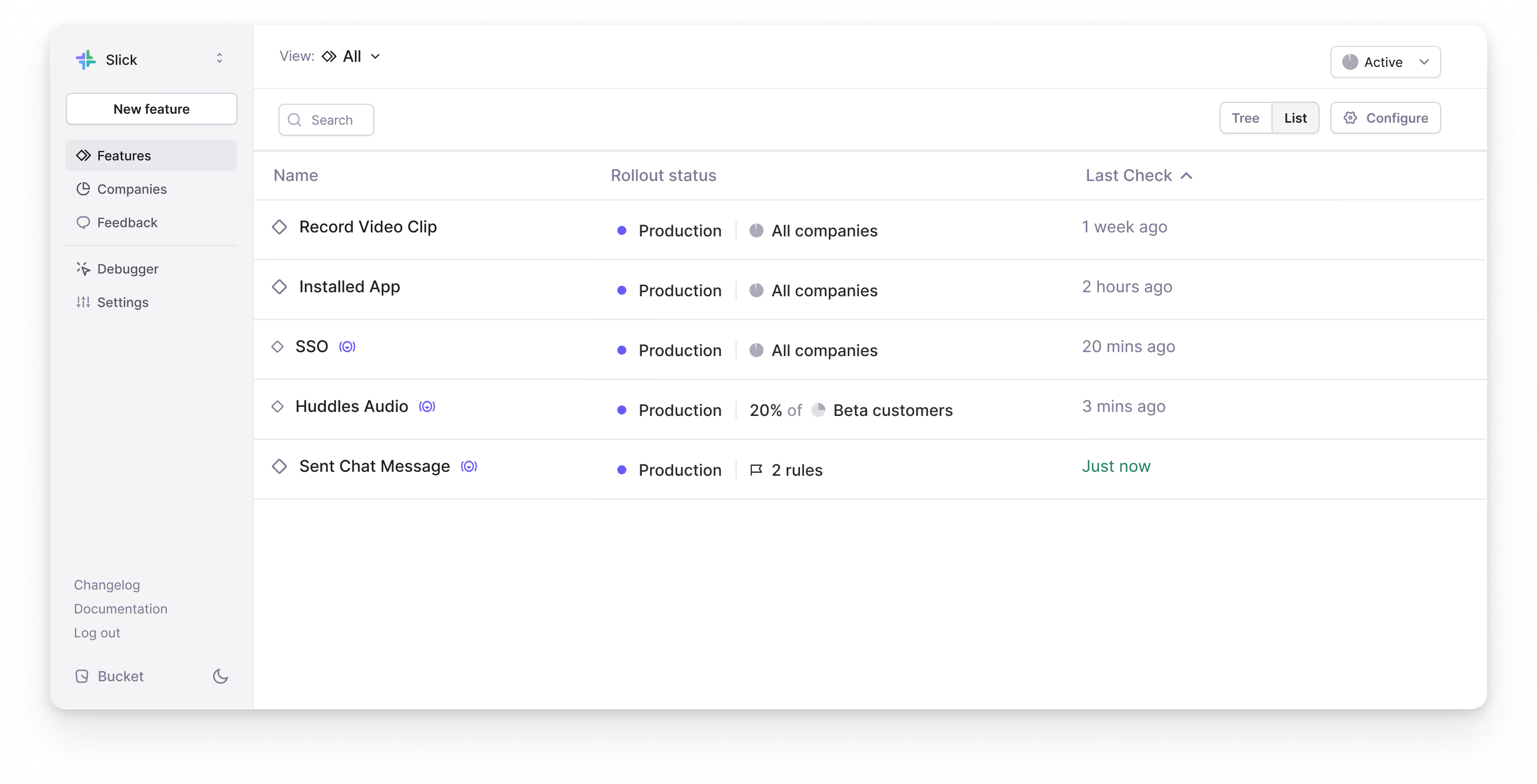
We’ve made it easy to detect stale feature flags by adding the “Last check” column to feature views.
The "Last check” column lets you confirm that you’ve properly removed the feature's key from your codebase and that checks are no longer firing.
What's a check exactly? A check is fired from the Bucket SDK whenever a user reaches code that's gated by a Bucket feature key in your app. The "Last check" column shows checks across all of your environments and is fired regardless of the check result (access granted or not).
Happy shipping!
Adding feature descriptions
We’ve just added feature descriptions to Bucket. Document each feature’s functionalities with full markdown support.
All the common syntax is supported including *italics*, **bold**, [link](https://example.com), and 'code'.
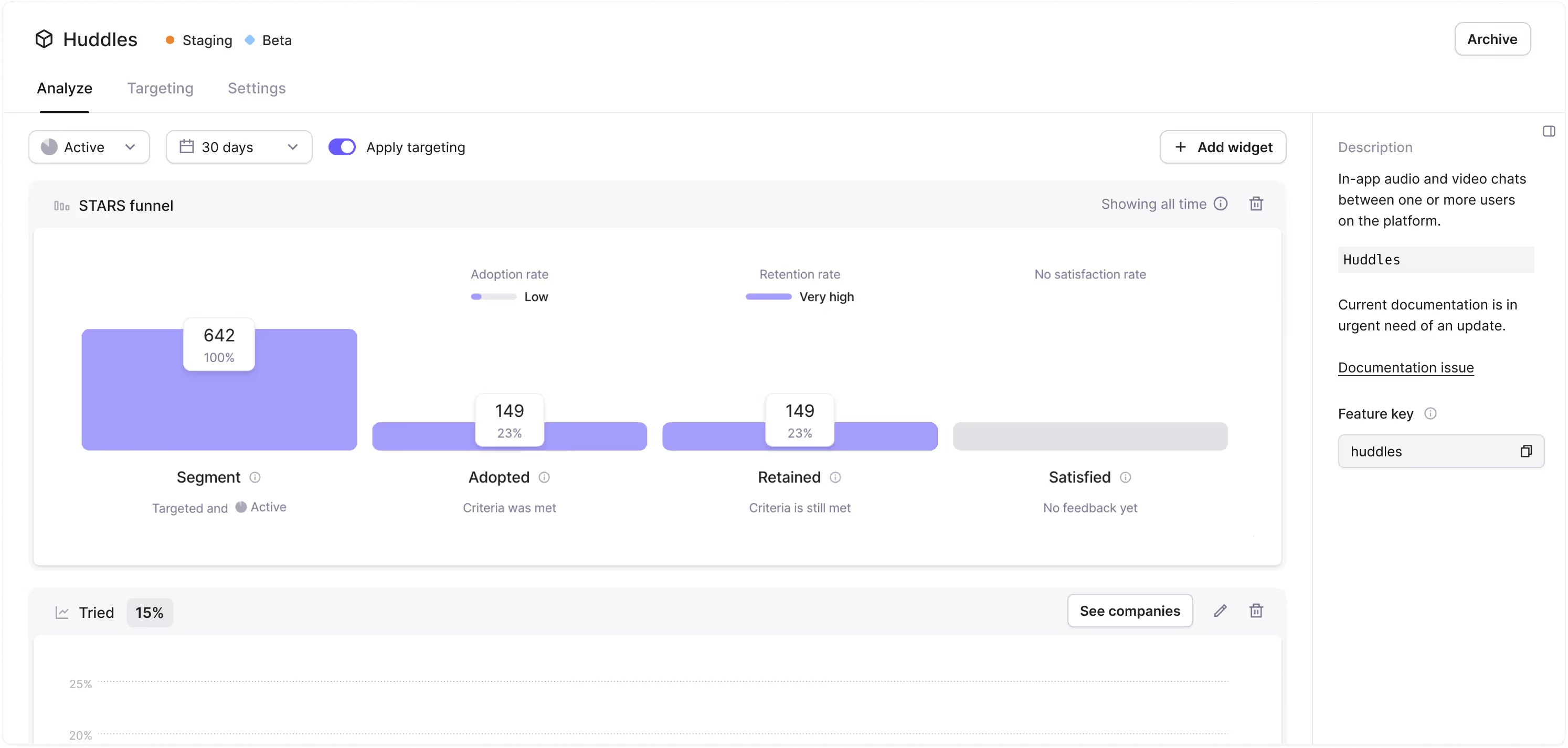
Feature descriptions appear in a sidebar on the Feature tabs.
Happy shipping!
Faster data tables
We’ve finished a comprehensive refactoring of our data tables, mainly used on feature views and segments, to significantly improve performance.
We’ve also improved the UX by making URLs shareable.
These updates have:
- Drastically improved performance of the data tables (up to 2x)
- Greatly improved data fetching
- Resolved some data persistence issues
- Shareable URLs
Happy shipping!
You can now sign up without a Google account
We’ve made it possible for non-Google SSO users to get started with Bucket. You can now sign up with Google or a regular email and password.
If you have a Google account, keep using the single sign-on option like before.
Thanks to Clerk for making it easy to add authentication methods!
Happy shipping!
Improved automated feedback indicator
We’ve made it easier to see which features have automated feedback surveys activated.
Features collecting user feedback now have an icon to the right of the name in the Features tab.
The no-code feedback surveys give your metrics valuable context and surface issues by automatically asking users for feedback after they’ve used a feature a meaningful number of times.

This lets you see which features are gathering automated feedback at a glance.
Happy feedback collecting!
Bucket SDKs support the OpenFeature standard
We’ve made it easy and low-risk to migrate to Bucket with our OpenFeature Node.js and Browser SDKs.
OpenFeature’s vendor-agnostic feature flagging API makes implementing Bucket faster and without the risk of being locked in.
If you already use an OpenFeature SDK, it’s simple to plug in Bucket and get started.
Those using React (with or without Next.js) just need to plug our OpenFeature Browser Provider into the OpenFeature React SDK. Our Next.js example shows you how.
Join the OpenFeature community at openfeature.dev.
Happy shipping!
New users now auto-join their organization
We’ve made it simpler to invite your colleagues to Bucket. Anyone who signs up for Bucket with an email address under your company domain will automatically join your organization.
Bucket checks the verified Google SSO domain when a new user signs up for Bucket. If the domain matches, they are automatically added to the existing organization.

You no longer need to share a Bucket invite link with your teammates. Instead, simply direct them to the login page.
Happy Shipping!
Adding feature flag and segment filters
We’ve made Bucket’s targeting rules and company segmentation even more powerful by adding feature flag and segment filters.
With segment filters, you can create new segments based on companies that are or are not already in another segment.
Feature flag filters allow you to filter based on feature flag access. This includes:
- Companies with access to any specific feature flags
- Companies without access to certain feature flags
- Companies with access to every flag in a list of feature flags
These filtering capabilities let you create new segments and targeting rules based on existing segments, feature flags, company attributes, and feature metrics!
How to use them in your B2B app
Let's say you're releasing a new video calling feature called Huddles Video alongside your existing audio calling feature, Huddles.
You only want to give users on your Pro plan who have already tried the Huddles feature access to the new feature.
You can create a new segment that meets that criteria with the following filters:
- Segment IN SEGMENT Pro plan
- Feature flag IS ENABLED huddles
- Feature metric Huddles STARS IS Tried
Happy Shipping!