Changelog
We ship product updates weekly. Follow us on 𝕏 for the latest.
Archiving segments
We’ve added segment archiving to Bucket. Now, segments attached to one or more feature flags are automatically archived instead of deleted.
This lets you continue evaluating a feature flag after its target segment is archived.
Archived segments won’t appear on your segments list. Instead, they will be labeled “Archived”.
Happy Shipping!
Downtime protection and improved latency with Local Evaluation
We’ve added local evaluation to Bucket to improve latency and provide downtime protection. Our Node.js SDK now supports local evaluation, which is perfect if you have a high volume of feature flags or are worried about intermittent downtime.
Generally, our SDKs send your user/company attributes to our servers and return a list of features that should be enabled. Since we operate a global network, we keep the initial evaluation round-trip time low.
However, if you’re concerned about potential downtime, you can evaluate features locally on your servers instead of sending a request to our servers. Our SDKs will download the targeting rules from our servers and run checks against the rules using the given user and company properties locally instead of contacting our servers for every evaluation.
The SDKs will periodically refresh the targeting rules to make sure any changes you make to targeting are in effect quickly.
Happy shipping!
Adding multi-select filter operators
We’ve added multi-select filters to Bucket. Now, you can filter using the ANY OF and NOT ANY OF filter operators.
These operators let you add or exclude multiple values for a single attribute when creating a segment, setting targeting rules, or defining feature tracking criteria.
For example, you can create a segment of paying companies while excluding any companies on the free plan.
They are classified as List operators in the operator dropdown.
Happy rollouts!
Adding environments
Alongside feature flags, we’ve also added environments to Bucket to let you create and manage distinct environments within Bucket, like development, staging, and production.
Bucket includes two default environments: Production and Staging. You can add, edit, and delete as many additional environments as you’d like.
Each environment you create is assigned a unique publishable key that ensures events and data are correctly attributed, maintaining clear separation and organization of data. You can switch between environments using the app switcher in the top left.
Environments lets you test feature flags and event tracking in safe, non-production environments before promoting to production. Since each environment is configured independently, you prevent cross-environment interference, let you test new features in isolated environments, and delineate stages to streamline development processes.
Check out the Environments documentation for all the technical details.
Happy rollouts!
Introducing feature flags for B2B
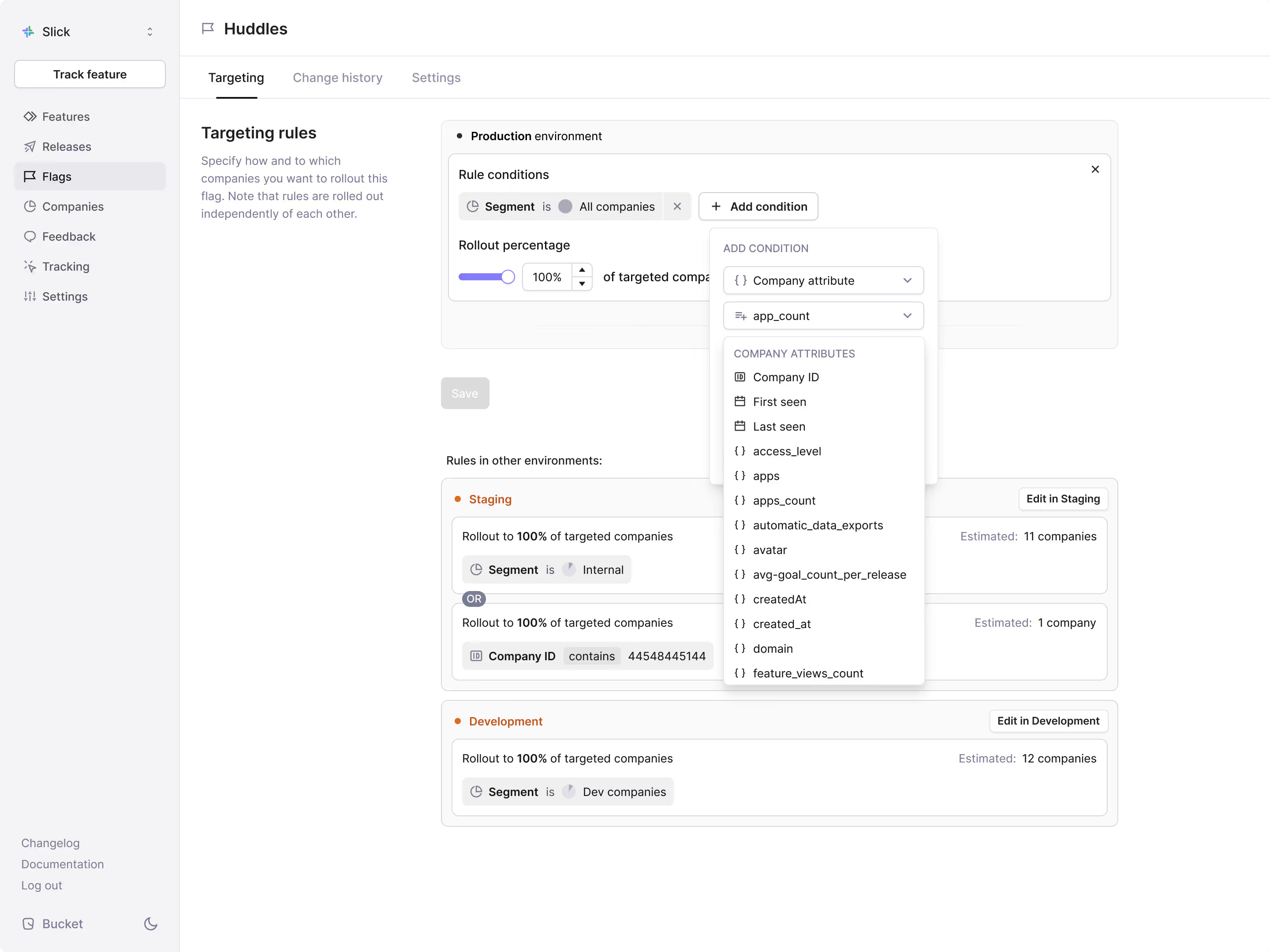
We’ve launched feature flags on Bucket. They're built for B2B and tightly integrated with Releases, which enables product teams to quickly collect customer engagement metrics and feedback on feature releases. And everyone has access with unlimited seats on all plans.
Bucket feature flags come with everything you’d expect. We handle gradual feature roll outs, allow for roll backs directly from our UI, and give you powerful targeting rules.
Bucket targeting rules are set at the company level, not the user level. You don’t need to group users into company-based segments, it’s done for you automatically.
Working natively at company level lets you set targeting rules for new feature flags based on existing powerful Bucket filters like past flag access, company ID, satisfaction score, and STARS stage, right out of the box.
Automated evaluation on release customer satisfaction
Modern product teams aren’t just rolling features out and forgetting about them. They’re checking in with customers to make sure the feature meets their needs. Whenever there’s an issue, the team acts fast to address it.
Bucket feature flags are deeply integrated within Releases to give you an automated evaluation workflow for weeks 0-12 of any new release.
Releases lets you define feature goals for a feature release and then automatically collects feature engagement metrics and qualitative feedback, and sends you goal progress updates via Slack.
This ensures product teams stay focused on the features that customers care about and save time on feature evaluation.

How to get started
It’s easy to get started with both client-side and server-side evaluation options.
React SDK
import BucketProvider from "@bucketco/react-sdk"

<BucketProvider
    publishableKey="{YOUR_PUBLISHABLE_KEY}"
    context={{
        // The context should take the form of { user: { id }, company: { id } }
        // plus anything additional you want to be able to evaluate flags against.
        user: { id: "john_doe" },
        company: { id: "acme_inc" },
    }}
>
    <YourApp />
</BucketProvider>
When the context provider is installed, use the useFeatureFlag hook to determine if a flag is enabled for a specific user or company:
import { useFeatureFlag } from "@bucketco/react-sdk";

const joinHuddleFlag = useFeatureFlag("join-huddle");
//{
//    "isLoading": false,
//    "value": true,
//}
Browser SDK
bucket.init({YOUR_PUBLISHABLE_KEY})

const flags = await bucket.getFeatureFlags({
  context: {
    user: { id: "john_doe" },
    company: { id: "acme_inc" },
  },
});
// {
//   "join-huddle": {
//     "key": "join-huddle",
//     "value": true
//   },
//   "post-message": {
//     "key": "post-message",
//     "value": true
//   }
// }
Node.js SDK
const bucket = new BucketClient('{YOUR_SECRET_KEY}')
const flags = await bucket.getFeatureFlags({
  context: {
    user: { id: "john_doe" },
    company: { id: "acme_inc" },
  },
});
HTTP API
GET https://front.bucket.co/{YOUR_PUBLISHABLE_KEY}/flags/evaluate?context.company.id=acme_iinc&context.user.id=john_doe

200 OK

{
  "success": true,
  "flags": {
    "join-huddle": {
      "key": "join-huddle",
      "value": true
    },
    "post-message": {
      "key": "post-message",
      "value": true
    }
  }
}
Our globally distributed network ensures that evaluation round-trip time stays low while flag lookups are cached in local storage to ensure subsequent lookups are instant.
Our feature flags are also integrated with environments. Each app in Bucket comes pre-configured with two default environments: Production and Staging.
You can add as many additional environments as you want.
Try it today
Sign up for private beta to try it for yourself. With unlimited seats on every plan, your whole team can have access.
Happy rollouts!
Adding a global feedback page
We’ve made it simpler to review feedback on all your features in one place with the global feedback page. You can filter feedback by STARS stage, feature, satisfaction score, and company.
Filtering feedback by feature is a new addition, providing an easy way to see satisfaction scores and qualitative feedback for a particular feature release.
Feedback is automatically collected from the right companies at the right time by Live Satisfaction. You can define the minimum number of interactions before requesting feedback, customize your prompts, and more.
If you’ve implemented Bucket with Segment, Live Satisfaction is enabled with no additional setup.
Happy shipping!
Introducing behavioral segments
We’ve added Behavioral Segments to Bucket. Now, you can filter companies and create segments based on feature usage.
You can create company-based segments by STARS state, usage frequency, customer satisfaction, event counts, and first or last usage date. You can combine them with company attribute filters to become even more granular and powerful.
This addition makes identifying power users and upsell opportunities, amongst many other use cases, simple. Since you’re working with easily understandable STARS states instead of messy event counts, you can:
- Identify power customers by filtering for companies that are frequent users of your key features.
- Find upsell opportunities by finding companies that have not yet started using valuable features.
- See which sub-features are popular in the context of companies that use their parent feature.
- Filter companies by usage frequency to see adopters that aren't using a feature often to understand feature stickiness.
- Filter companies by satisfaction ratings to, for example, find enterprise customers that have left a dissatisfied score on a key feature.
They also let you roll out feature flags to the most relevant companies.
For example, you’re about to roll out a feature flag called “Huddle Polls” and want your initial beta segment to contain only “Huddle” power users. These filters allow you to create a segment with companies in the Retained STARS stage who use “Huddle” daily.
Happy shipping!
Improving goals
We’ve made it easier to stay on top of your feature releases’ goal progression. Now, you can get more details of goal progression directly in Releases. The new interface gives you at-a-glance insights into feature engagement and satisfaction, including target values, feature names, and goal subsegments.
We’ve started displaying goal progression in absolute values. This makes goals, particularly percentage-based goals, clearer and easier to communicate.
When you dive into a specific feature, you’ll see visualizations showing goal progression since release, letting you follow its evolution and understand the impact of iterations.
If you’re setting up a new goal, we’ve improved metric dropdown to make it simple to quickly select the most frequently used goal metrics.
Happy shipping!
Visualize feature satisfaction over time
We’ve made it simple to visualize overall feature satisfaction over time for companies in any STARS state. The visualization gives you a simple way to ensure you’re making iterations that improve feature satisfaction scores.
You can now see a rolling average of satisfaction scores for each feature alongside the qualitative feedback from Live Satisfaction's no-code surveys that you know and love.
The distribution chart surfaces dissatisfied companies, making it simple to act on their feedback and convert them into satisfied customers.
You can select different evaluation periods and rolling average time windows that can be as granular as you need.
Happy shipping!
Cleaning up the sidebar
We’ve added new core functionalities to Bucket: Releases and feature flags. With the release of these new features, we’ve cleaned up the sidebar.
Now, it only contains top-level items: Features, Releases, Flags, Companies, Tracking, and Settings.
To jump between feature views and segments, use the new switcher interface found next to the title as shown in the video above.
Happy shipping!